
example.md 2.5 KB
tags: factory title: Spawn enemies with script properties brief: This example shows how to spawn enemy game objects using a factory component with different properties. author: Defold Foundation scripts: ship.script, enemy.script, spawner.script
thumbnail: thumbnail.png
This example shows how to dynamically spawn enemy game objects using a factory component with different properties. The setup consists of three main components: a player ship, enemy spawner, and different enemy types with customizable properties.
Press keys 1, 2, or 3 to spawn different enemy types.
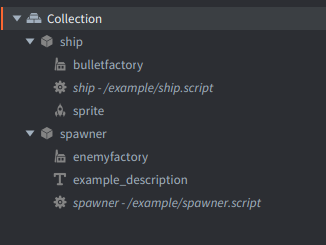
Example collection consists of 2 game objects:
Ship
The red ship at the bottom that automatically moves and shoots. Consists of:
- A Factory component
bulletfactoryto spawn bullet game objects - A Script
shipthat handles automatic movement (ping-pong animation) and bullet spawning every 0.25 seconds - A Sprite component with the spaceship image
Bullets are simply animated upward and automatically deleted when they reach the top.
Spawner
Controls enemy spawning with keyboard input. Consists of:
- A Factory
enemyfactoryto spawn enemies with different properties - A Label
example_descriptionwith instructions text displayed on top - A Script
spawnerthat spawns enemies.
The spawner script defines three different enemy types: random, diagonal, and straight.
Uses factory to create enemies with specific properties:
local properties = ENEMY_TYPES[enemy_type]
factory.create("#enemyfactory", position, nil, properties)
Enemy Types
Random Enemy (Key 1):
- Green UFO sprite
- 1 health point
- Random horizontal movement that changes every second
- Speed: 40 horizontal, -100 vertical
Diagonal Enemy (Key 2):
- Red enemy sprite
- 2 health points
- Fixed diagonal movement
- Speed: 120 horizontal, -80 vertical
Straight Enemy (Key 3):
- Blue enemy sprite
- 3 health points
- Straight downward movement
- Speed: 0 horizontal, -40 vertical
Enemy Script Properties
Properties defined in enemy.script control enemy behavior:
sprite- Which sprite to displayhealth_points- How many hits before destructionspeed- Movement velocity vectoris_random- Whether to use random movement changes
When enemies have go.property defined in their script, these properties are visible in the Properties pane and can be customized per enemy type.
Combine this example with other movement and physics examples to create a complete shoot'em up game!