
 Jonny Galloway
000533483b
all maya envars and defaults in constants
Jonny Galloway
000533483b
all maya envars and defaults in constants
|
3 lat temu | |
|---|---|---|
| .. | ||
| DCC | 3 lat temu | |
| IDE | 3 lat temu | |
| Solutions | 3 lat temu | |
| .gitignore | 3 lat temu | |
| Env_DCC_Blender.bat | 3 lat temu | |
| Env_DCC_Maya.bat | 3 lat temu | |
| Env_DCC_Substance.bat | 3 lat temu | |
| Env_Dev.bat.example | 3 lat temu | |
| Env_IDE_PyCharm.bat | 3 lat temu | |
| Env_IDE_VScode.bat | 3 lat temu | |
| Env_IDE_Wing.bat | 3 lat temu | |
| Env_O3DE_Core.bat | 3 lat temu | |
| Env_O3DE_Python.bat | 3 lat temu | |
| Env_O3DE_Qt.bat | 3 lat temu | |
| Launch_O3DE_PY.bat | 3 lat temu | |
| Launch_O3DE_PY_Cmd.bat | 3 lat temu | |
| readme.md | 3 lat temu | |
readme.md
O3DE (Open 3D Engine)
O3DE (Open 3D Engine) is an open-source, real-time, multi-platform 3D engine that enables developers and content creators to build AAA games, cinema-quality 3D worlds, and high-fidelity simulations without any fees or commercial obligations.
O3DE DCCsi Dev Windows Enviroments
DccScriptingInterface (DCCsi) is a framework for O3DE extensions, for example:
- Lightweight python integrations with DCC tools like Maya
- O3DE configuration, customization and extensions of tools
- Standalone PySide2/Qt tools
- ^ These might utilize a mix of O3DE and DDC python APIs
The DccScriptingInterface\config.py, procedurally provides a synthetic env context. This env is a data-driven approach to configuring layered and managed env settings.
This env provides the hooks for DDC apps and/or standalone tools, to configure acess to O3DE code (for boostrapping), safely retreive known paths, set/get developer flags, etc.
- < O3DE >/DccScriptingInterface/Tools/Dev/Windows/*
This is a .bat file based version of the default env context for development on windows. ( there is a synthetic/dynamic/procedural env config and settings: < DCCsi >/config.py )
This is what we currently use to boot the default env context such that it is available, when launching a development tool such as a IDE or a DCC tool. The .bat env was stood up first, the value in doing so is to work out the dependancies and kinks and provide a viable development environment in which to create solutions like the dynamic config.py, if that syntehetic environment is broken we always have this fallback, this allows a developer to troubleshoot/debug code, like making changes to < DCCsi >/config.py
Other tools, can use config.py to stand up the env context.
What is in this folder ...
Core env modules
Env_O3DE_Core.bat       : core access to O3DE and DCCsi
Env_O3DE_Python.bat     : access to O3DE python and general py configuration
Env_O3DE_Qt.bat         : access to O3DE Qt .dll files and PySide2
DCC add on envars
Env_DCC_Maya.bat        : configures Maya with code O3DE/DCCsi access
Env_DCC_Blender.bat     : configures Blender
Env_DCC_Substance.bat   : Configures Substance Designer
IDE env
Env_IDE_Wing.bat        : configures WingIDE for DCCsi development
Env_IDE_VScode.bat      : configures VScode
Env_IDE_PyCharm.bat     : configures PyCharm
Core Env Launchers
Launch_O3DE_PY_Cmd.bat  : Starts a cmd with core managed env context
                        : ^ allows user to validate env
                        : ^ display all default ENVAR plugs
                        : ^ allows user to test O3DE python + scripts from cmd
Launch_O3DE_PY.bat      : Starts o3de python with same access as above
                        : ^ for instance, test Dccsi\config.py like this:
                        : {DCCsi prommpt}>python config.py
DCC Launchers
A set of DCC tool launchers are here, these init the env and then launch the tool within the managed env context:
- < O3DE >/DccScriptingInterface/Tools/Dev/Windows/DCC/*
- Launch_Maya_2020.bat : Starts Maya2020 within managed env context
IDE Launchers
A set of IDE launchers for developers are here, these init the env and then launch the IDE within the managed env context:
- < O3DE >/DccScriptingInterface/Tools/Dev/Windows/IDE/*
- Launch_WindIDE-7-1.bat : Starts WingIDE within managed env context
Note: per-tool launchers will be moved into the tools directory and these may be deprecated in the future. We will maintain them in both places for now diring the transition.
Instructions
How to test the synthetic environment and settings externally
Option 1) Run the DCCsi cmd: < O3DE >/DccScriptingInterface/Tools/Dev/Windows/Launch_O3DE_PY_Cmd.bat
- CWD: C:< O3DE >\Gems\AtomLyIntegration\TechnicalArt\DccScriptingInterface>
Run command (prompt):>python config.py -dm=True -py=True -qt=True -tp=True
Note: using this route, will test how .bat envar hooks interact with code (.bat envars should propogate)
Additionally there are patterns for devs to locally alter the env without code:
- < DCCsi >/Tools/Dev/Windows/Env_dev.bat (interacts directly with .bat env)
- < DCCsi >/.env (dev global envar override, mainly for testing)
- < DCCsi >/settings.local.json (cache of local settings, new values are persistant)
Option 2) Opn a command prompt from this location: "C:< O3DE >\python\"
- CWD: C:< O3DE >\python>
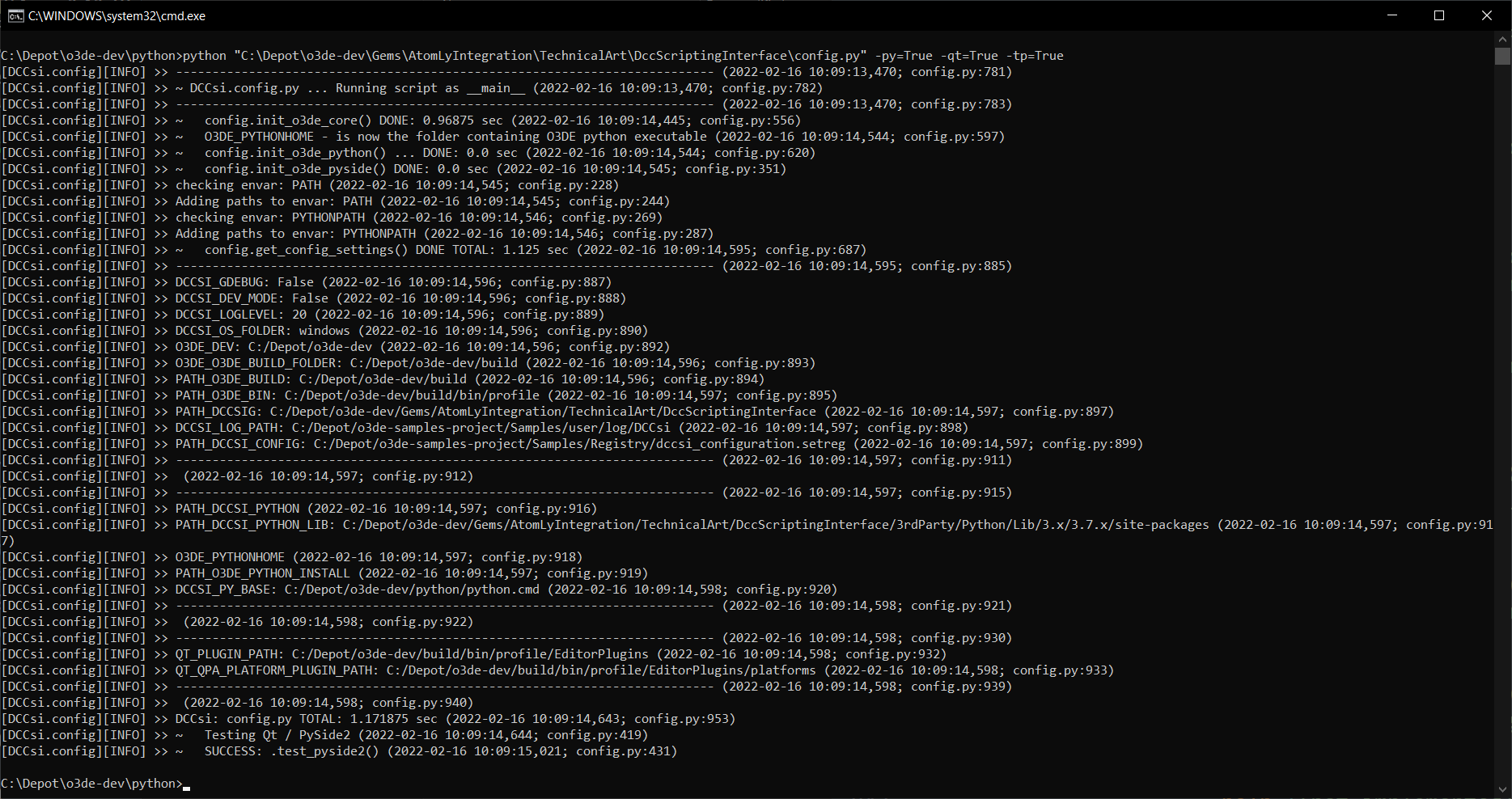
Run command (prompt):>python "C:\Depot\o3de-dev\Gems\AtomLyIntegration\TechnicalArt\DccScriptingInterface\config.py" -dm=True -py=True -qt=True -tp=True
Note: using this route, config.py will synthetically derive the env context (no use of .bat files)
What this does?
Here is a rundown of what is happeneing:
- runs the O3DE python exe
- starts the config.py which begins to procedurally create synthetic/dynamic environment (hooks)
- ^ this starts with DCCsi hooks
- arg: -dm=True, enters 'dev mode'(-dm) and attempts to attach debugger (Wing IDE only for now, others planned)
- arg: -py=True, enables additional O3DE python hooks and code access
- ^ great for standalone tools, but you don't want that functionality to interfer with other DCC tools python environments (like Maya!)
- arg: -qt=True, enables access to O3DE Qt .dlls and PySide2 python package support(-qt)
- ^ great for standalone PySide2 which can operate outside of the O3DE editor
- arg: -tp=True, will run a PySide2 test (pop-up button) to validate access
- note: config.py has a number of other cli args you may find useful
What does this look like?
Using just these basic options (no -dm, devmode): -py=True -qt=True -tp=True
The synthetic environment looks like:
Contribute
For information about contributing to Open 3D Engine, visit https://o3de.org/docs/contributing/.
License
For terms please see the LICENSE*.TXT files at the root of this distribution.
LICENSE INFO
Copyright (c) Contributors to the Open 3D Engine Project. For complete copyright and license terms please see the LICENSE at the root of this distribution.
SPDX-License-Identifier: Apache-2.0 OR MIT