
Terminal with graphical UI, syntax highlighting and automation for telnet, ssh, and serial.
#terminal #ssh #visual #gui #pascal #fpc #lazarus #terminal-emulator #remote-manager #session-manager #ssh-manager #ssh-gui
 Tito Hinostroza
b8e6f72674
Documentación
Tito Hinostroza
b8e6f72674
Documentación
|
il y a 1 an | |
|---|---|---|
| Docs | il y a 1 an | |
| _libraries | il y a 3 ans | |
| _screenshots | il y a 5 ans | |
| _source | il y a 1 an | |
| languages | il y a 3 ans | |
| macros | il y a 11 ans | |
| scripts | il y a 11 ans | |
| Cambios.txt | il y a 2 ans | |
| LEEME.md | il y a 9 ans | |
| LICENSE | il y a 11 ans | |
| README.md | il y a 1 an | |
| TitoTerm.exe | il y a 1 an | |
| TitoTerm.xml | il y a 1 an | |
| plink.exe | il y a 3 ans | |
| psftp.exe | il y a 5 ans | |
| version.txt | il y a 1 an |
README.md
Tito-s-Terminal 0.8.4
Terminal with graphical interface, syntax highlighting and automation for telnet, ssh, serial or any command line proccess.

For Telnet and SSH connections, use the well-known PLink, program but any other similar client could be used.
The program is strongly configurable, with innumerable options for the appearance and the way of working. To avoid having to constantly configure the environment, session management is included, which can save all the configuration in a single file, and which can then be easily recovered, with a couple of "Clicks".
Sessions
Connections are managed using sessions. A session is a document that includes all parameters of a typical connection like a SSH, or TELNET sesion.
Unlike other similar programs, here, the sessions include a text panel (Command Panel), and a Terminal windows. The Command panel is used to send the commands to the terminal. It is not convenient to send them directly, because the console is not prepared for direct interaction with the user.
The terminal screen responds in a similar way to a VT100 console, but without the highlight options (color, bold and bright). However, the text displayed in the terminal includes syntax coloring (for the UNIX Shell language) and code folding.
The width of the screen is not limited by the size of the VT100 (which defaults to 80 characters),. It can be extended up to several hundred more characters.
Setting a connection
When creating a new session, the settings form is shown to set the connection parameters.

Here you can define the type of connection and the connection parameters. You can also define additional parameters, such as the appearance of the window or the behavior of the terminal. All these settings will be saved in the session.
If you want to handle an external program by command line, you must select the option "Other".
For example, if you want to interact with the Windows command interpreter, you must use the "cmd" program.

Prompt Detection
The terminal can be configured to recognize the arrival of the system prompt. It also highlights it with a special color.
Prompt detection is visually useful and is also necessary for some additional tools that are included in the program such as Remote Explorer and Remote Editor.
The prompt detection is not done directly. It must first be configured in the terminal. This is done from the "General> Prompt detection" option from the session properties window:

Prompt detection is based on the fact that it is possible to completely identify the Prompt on a line, defining the initial and final characters that delimit it.
In the figure shown, the characters "[" and "] $" have been defined for the prompt. In this way, the following prompts can be recognized:
- [user @ host] $
- [user @ localhost ~] $
- [CMD] $
Tools
The remote file browser works by interacting with the terminal, through commands, but only for Telnet and SSH sessions. In this way a file browser can be emulated on UNIX / Linux connections.

A remote editor is also included, which interacting, through commands, with the "shell" allows editing of small files, from within the same "shell" UNIX / Linux.
The remote editor includes syntax highlighting (for various languages), code folding, and code autocompletion.
Macros
Tito's Terminal also allows the automation of connections with a macro language similar to that used for TeraTerm. It also includes a code editor prepared exclusively for writing and testing macros.
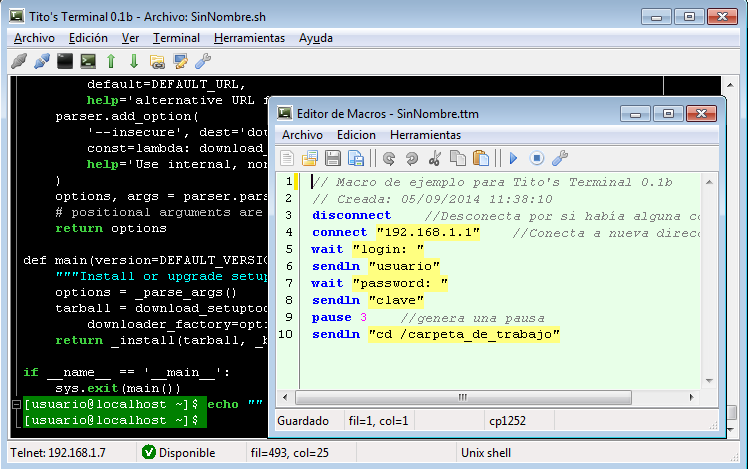
The macro execution functions, have a direct access from the main menu.