## VSCode Plugin
* [xmake-vscode](https://github.com/xmake-io/xmake-vscode)
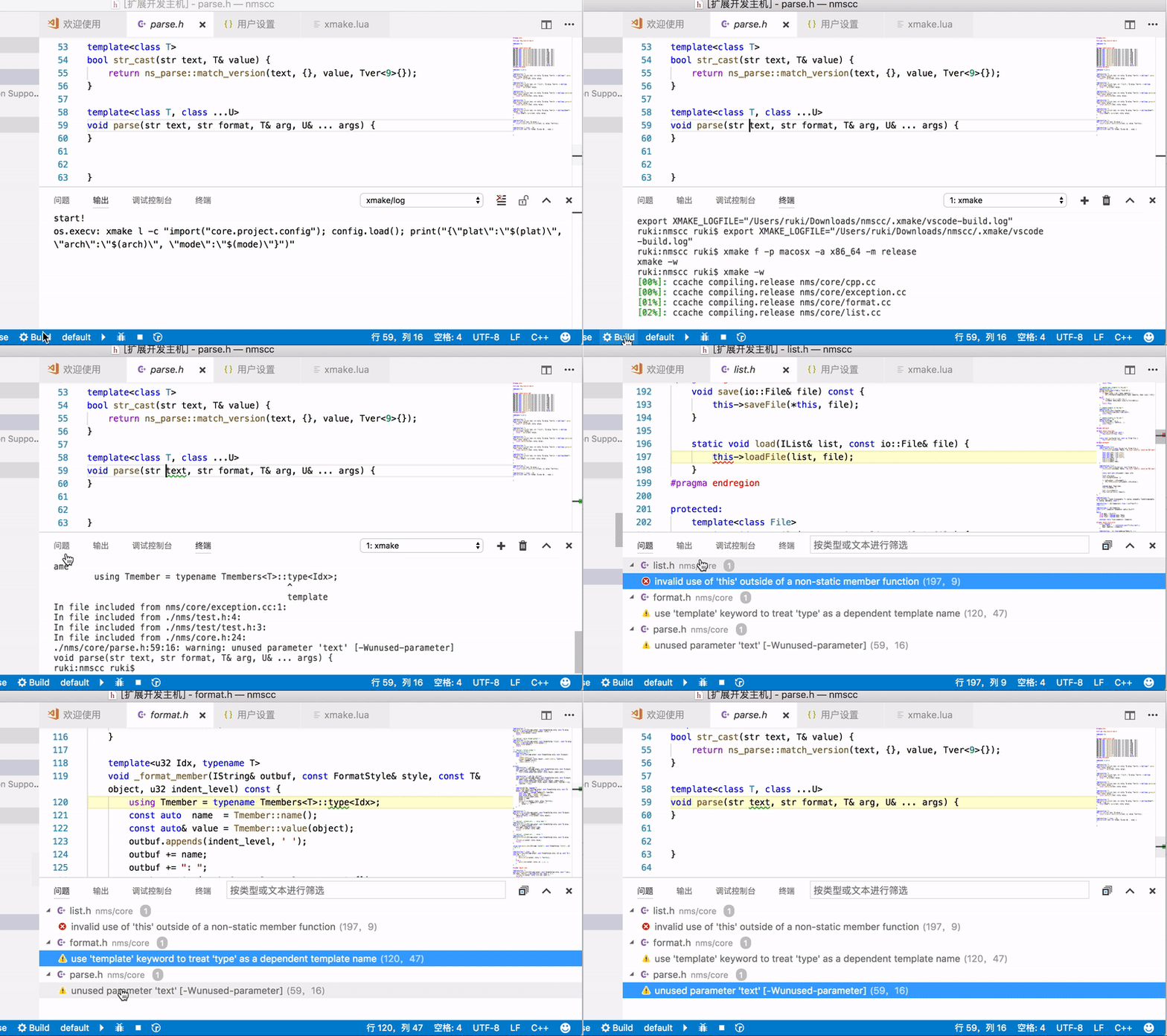 [VSCode](https://code.visualstudio.com/)is a commonly used text editor, and xmake provides plug-ins' support.
### Plugin installation
Since VSCode itself only provides text editing functions, we need to install plug-ins to support configuration, compilation, debugging, intellisenses and other functions:
* XMake
* C/C++
* CodeLLDB
After completing the installation of the plug-in, restart VSCode to see the status bar below:

You can set the platform, architecture, compilation mode, tool-chain and other options in the status bar, and then click Build to start the build.
### Custom options
If these options are not enough, you can create .vscode/settings.json and write the settings required by xmake, such as:
```
{
...
"xmake.additionalConfigArguments": [
"--my_option=true"
],
...
}
```
Other xmake options can also be setted in settings.json. After modification, the configuration can be refreshed through the >XMake: Configure command.
### Improve the development experience with LSP
For a better C++ intellisense experience, xmake provides support for [Language Server Protocol](https://microsoft.github.io/language-server-protocol/) (LSP for short). In vscode, you can use the >XMake: UpdateIntellisense command to generate .vscode/compile_commands.json (usually when modifying xmake.lua, this file will be generated automatically). At the same time, we can choose to install a intellisense plug-in that supports LSP, such as [clangd](https://clangd.llvm.org/) published by LLVM, which is stable and efficient, and support different tool-chain through the LSP standard.
When using clangd, there may be conflicts with the C/C++ plug-in, you can add settings in .vscode/settings.json:
```
{
"C_Cpp.codeAnalysis.runAutomatically": false,
"C_Cpp.intelliSenseEngine": "Disabled",
"C_Cpp.formatting": "Disabled",
"C_Cpp.autoAddFileAssociations": false,
"C_Cpp.autocompleteAddParentheses": false,
"C_Cpp.autocomplete": "Disabled",
"C_Cpp.errorSquiggles": "Disabled",
...
}
```
Also, since the compile_commands.json generated by XMake is in the .vscode directory, you need to set the clangd parameter to look for it in the correct location:
```
{
"clangd.arguments": [
"--compile-commands-dir=.vscode",
...
]
...
}
```
## Sublime Plugin
* [xmake-sublime](https://github.com/xmake-io/xmake-sublime)
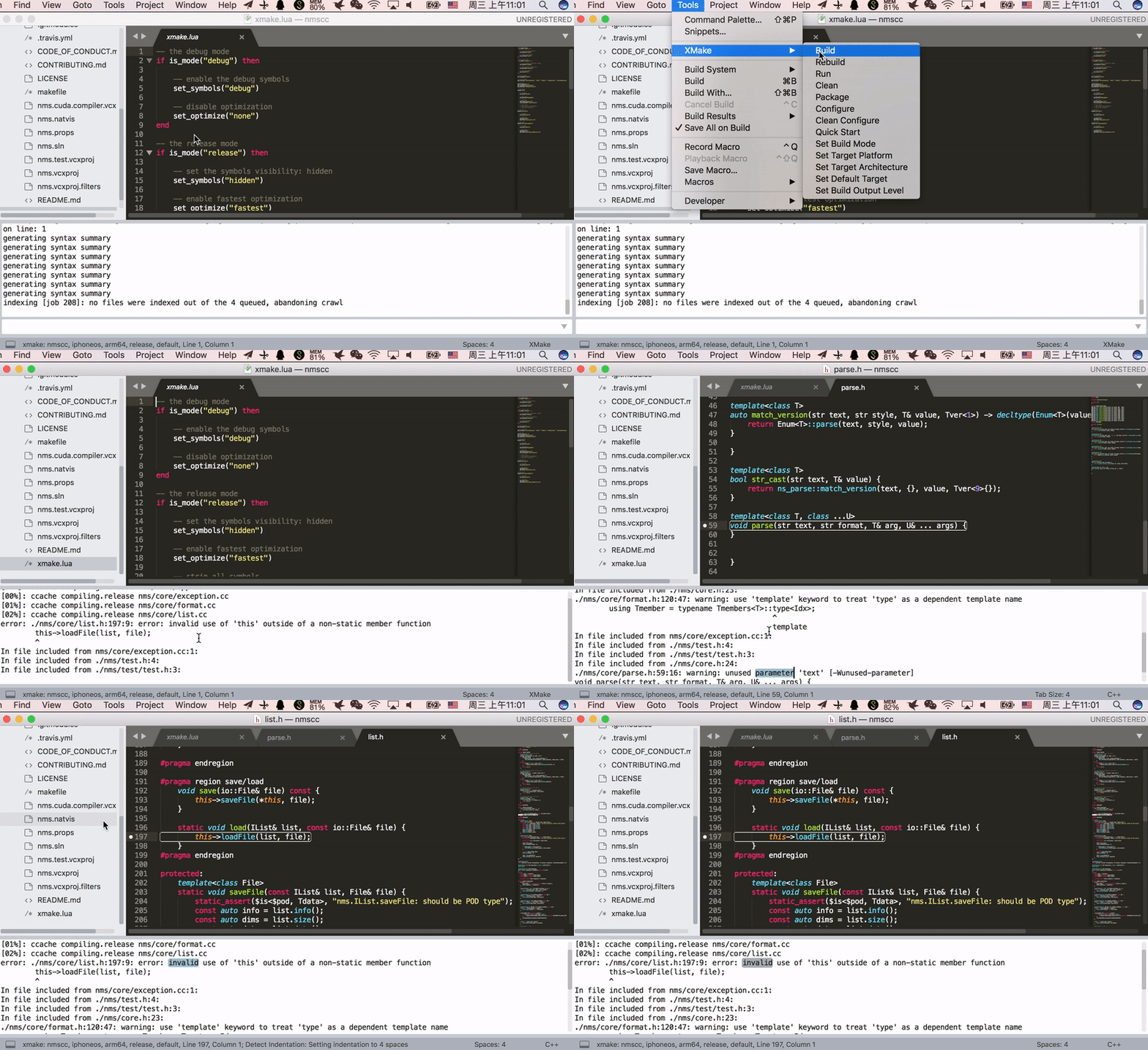
[VSCode](https://code.visualstudio.com/)is a commonly used text editor, and xmake provides plug-ins' support.
### Plugin installation
Since VSCode itself only provides text editing functions, we need to install plug-ins to support configuration, compilation, debugging, intellisenses and other functions:
* XMake
* C/C++
* CodeLLDB
After completing the installation of the plug-in, restart VSCode to see the status bar below:

You can set the platform, architecture, compilation mode, tool-chain and other options in the status bar, and then click Build to start the build.
### Custom options
If these options are not enough, you can create .vscode/settings.json and write the settings required by xmake, such as:
```
{
...
"xmake.additionalConfigArguments": [
"--my_option=true"
],
...
}
```
Other xmake options can also be setted in settings.json. After modification, the configuration can be refreshed through the >XMake: Configure command.
### Improve the development experience with LSP
For a better C++ intellisense experience, xmake provides support for [Language Server Protocol](https://microsoft.github.io/language-server-protocol/) (LSP for short). In vscode, you can use the >XMake: UpdateIntellisense command to generate .vscode/compile_commands.json (usually when modifying xmake.lua, this file will be generated automatically). At the same time, we can choose to install a intellisense plug-in that supports LSP, such as [clangd](https://clangd.llvm.org/) published by LLVM, which is stable and efficient, and support different tool-chain through the LSP standard.
When using clangd, there may be conflicts with the C/C++ plug-in, you can add settings in .vscode/settings.json:
```
{
"C_Cpp.codeAnalysis.runAutomatically": false,
"C_Cpp.intelliSenseEngine": "Disabled",
"C_Cpp.formatting": "Disabled",
"C_Cpp.autoAddFileAssociations": false,
"C_Cpp.autocompleteAddParentheses": false,
"C_Cpp.autocomplete": "Disabled",
"C_Cpp.errorSquiggles": "Disabled",
...
}
```
Also, since the compile_commands.json generated by XMake is in the .vscode directory, you need to set the clangd parameter to look for it in the correct location:
```
{
"clangd.arguments": [
"--compile-commands-dir=.vscode",
...
]
...
}
```
## Sublime Plugin
* [xmake-sublime](https://github.com/xmake-io/xmake-sublime)
 ## Intellij IDEA/Clion Pluin
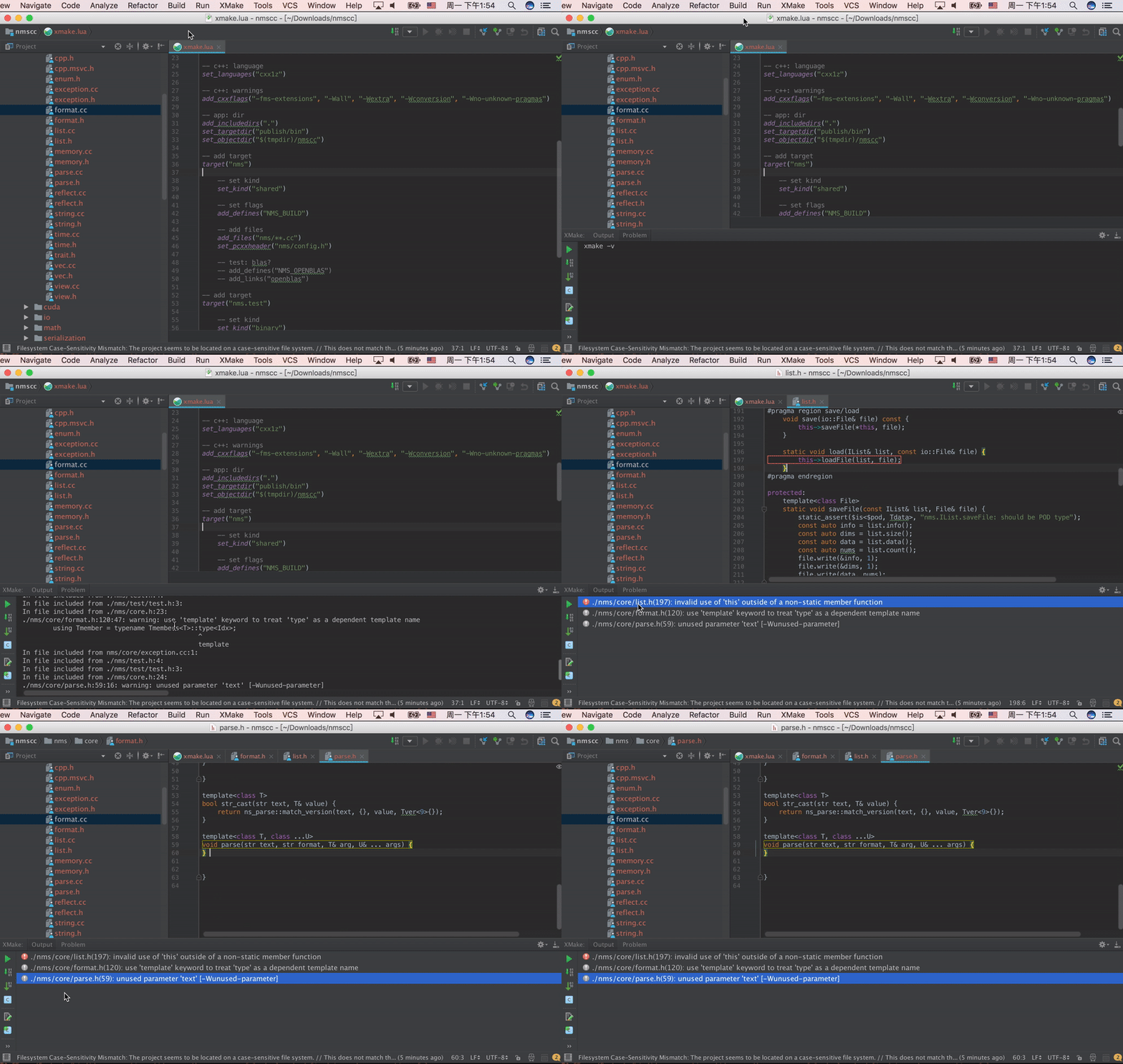
* [xmake-idea](https://github.com/xmake-io/xmake-idea)
## Intellij IDEA/Clion Pluin
* [xmake-idea](https://github.com/xmake-io/xmake-idea)
 ## Vim Plugin
* [xmake.vim](https://github.com/luzhlon/xmake.vim) (third-party, thanks [@luzhlon](https://github.com/luzhlon))
## Gradle Plugin (JNI)
* [xmake-gradle](https://github.com/xmake-io/xmake-gradle): A gradle plugin that integrates xmake seamlessly
### plugins DSL
```
plugins {
id 'org.tboox.gradle-xmake-plugin' version '1.0.9'
}
```
### Legacy plugin application
```
buildscript {
repositories {
maven {
url "https://plugins.gradle.org/m2/"
}
}
dependencies {
classpath 'org.tboox:gradle-xmake-plugin:1.0.9'
}
repositories {
mavenCentral()
}
}
apply plugin: "org.tboox.gradle-xmake-plugin"
```
### Simplest Example
We add `xmake.lua` to `projectdir/jni/xmake.lua` and enable xmake in build.gradle.
#### build.gradle
```
android {
externalNativeBuild {
xmake {
path "jni/xmake.lua"
}
}
}
```
#### JNI
The JNI project structure:
```
projectdir
- src
- main
- java
- jni
- xmake.lua
- *.cpp
```
xmake.lua:
```lua
add_rules("mode.debug", "mode.release")
target("nativelib")
set_kind("shared")
add_files("nativelib.cc")
```
### More Gradle Configuations
```
android {
defaultConfig {
externalNativeBuild {
xmake {
// append the global cflags (optional)
cFlags "-DTEST"
// append the global cppflags (optional)
cppFlags "-DTEST", "-DTEST2"
// switch the build mode to `debug` for `xmake f -m debug` (optional)
buildMode "debug"
// set abi filters (optional), e.g. armeabi, armeabi-v7a, arm64-v8a, x86, x86_64
// we can also get abiFilters from defaultConfig.ndk.abiFilters
abiFilters "armeabi-v7a", "arm64-v8a"
}
}
}
externalNativeBuild {
xmake {
// enable xmake and set xmake.lua project file path
path "jni/xmake.lua"
// enable verbose output (optional), e.g. verbose, warning, normal
logLevel "verbose"
// set c++stl (optional), e.g. c++_static/c++_shared, gnustl_static/gnustl_shared, stlport_static/stlport_shared
stl "c++_shared"
// set the given xmake program path (optional)
// program /usr/local/bin/xmake
// disable stdc++ library (optional)
// stdcxx false
// set the given ndk directory path (optional)
// ndk "/Users/ruki/files/android-ndk-r20b/"
// set sdk version of ndk (optional)
// sdkver 21
}
}
}
```
### Build JNI and generate apk
The `xmakeBuild` will be injected to `assemble` task automatically if the gradle-xmake-plugin has been applied.
```console
$ ./gradlew app:assembleDebug
> Task :nativelib:xmakeConfigureForArm64
> Task :nativelib:xmakeBuildForArm64
>> xmake build
[ 50%]: cache compiling.debug nativelib.cc
[ 75%]: linking.debug libnativelib.so
[100%]: build ok!
>> install artifacts to /Users/ruki/projects/personal/xmake-gradle/nativelib/libs/arm64-v8a
> Task :nativelib:xmakeConfigureForArmv7
> Task :nativelib:xmakeBuildForArmv7
>> xmake build
[ 50%]: cache compiling.debug nativelib.cc
[ 75%]: linking.debug libnativelib.so
[100%]: build ok!
>> install artifacts to /Users/ruki/projects/personal/xmake-gradle/nativelib/libs/armeabi-v7a
> Task :nativelib:preBuild
> Task :nativelib:assemble
> Task :app:assembleDebug
```
### Force to rebuild JNI
```console
$ ./gradlew nativelib:xmakeRebuild
```
## Vim Plugin
* [xmake.vim](https://github.com/luzhlon/xmake.vim) (third-party, thanks [@luzhlon](https://github.com/luzhlon))
## Gradle Plugin (JNI)
* [xmake-gradle](https://github.com/xmake-io/xmake-gradle): A gradle plugin that integrates xmake seamlessly
### plugins DSL
```
plugins {
id 'org.tboox.gradle-xmake-plugin' version '1.0.9'
}
```
### Legacy plugin application
```
buildscript {
repositories {
maven {
url "https://plugins.gradle.org/m2/"
}
}
dependencies {
classpath 'org.tboox:gradle-xmake-plugin:1.0.9'
}
repositories {
mavenCentral()
}
}
apply plugin: "org.tboox.gradle-xmake-plugin"
```
### Simplest Example
We add `xmake.lua` to `projectdir/jni/xmake.lua` and enable xmake in build.gradle.
#### build.gradle
```
android {
externalNativeBuild {
xmake {
path "jni/xmake.lua"
}
}
}
```
#### JNI
The JNI project structure:
```
projectdir
- src
- main
- java
- jni
- xmake.lua
- *.cpp
```
xmake.lua:
```lua
add_rules("mode.debug", "mode.release")
target("nativelib")
set_kind("shared")
add_files("nativelib.cc")
```
### More Gradle Configuations
```
android {
defaultConfig {
externalNativeBuild {
xmake {
// append the global cflags (optional)
cFlags "-DTEST"
// append the global cppflags (optional)
cppFlags "-DTEST", "-DTEST2"
// switch the build mode to `debug` for `xmake f -m debug` (optional)
buildMode "debug"
// set abi filters (optional), e.g. armeabi, armeabi-v7a, arm64-v8a, x86, x86_64
// we can also get abiFilters from defaultConfig.ndk.abiFilters
abiFilters "armeabi-v7a", "arm64-v8a"
}
}
}
externalNativeBuild {
xmake {
// enable xmake and set xmake.lua project file path
path "jni/xmake.lua"
// enable verbose output (optional), e.g. verbose, warning, normal
logLevel "verbose"
// set c++stl (optional), e.g. c++_static/c++_shared, gnustl_static/gnustl_shared, stlport_static/stlport_shared
stl "c++_shared"
// set the given xmake program path (optional)
// program /usr/local/bin/xmake
// disable stdc++ library (optional)
// stdcxx false
// set the given ndk directory path (optional)
// ndk "/Users/ruki/files/android-ndk-r20b/"
// set sdk version of ndk (optional)
// sdkver 21
}
}
}
```
### Build JNI and generate apk
The `xmakeBuild` will be injected to `assemble` task automatically if the gradle-xmake-plugin has been applied.
```console
$ ./gradlew app:assembleDebug
> Task :nativelib:xmakeConfigureForArm64
> Task :nativelib:xmakeBuildForArm64
>> xmake build
[ 50%]: cache compiling.debug nativelib.cc
[ 75%]: linking.debug libnativelib.so
[100%]: build ok!
>> install artifacts to /Users/ruki/projects/personal/xmake-gradle/nativelib/libs/arm64-v8a
> Task :nativelib:xmakeConfigureForArmv7
> Task :nativelib:xmakeBuildForArmv7
>> xmake build
[ 50%]: cache compiling.debug nativelib.cc
[ 75%]: linking.debug libnativelib.so
[100%]: build ok!
>> install artifacts to /Users/ruki/projects/personal/xmake-gradle/nativelib/libs/armeabi-v7a
> Task :nativelib:preBuild
> Task :nativelib:assemble
> Task :app:assembleDebug
```
### Force to rebuild JNI
```console
$ ./gradlew nativelib:xmakeRebuild
```