
xrepo






A cross-platform C/C++ package manager based on Xmake
A cross-platform C/C++ package manager based on Xmake
 ## Introduction ([中文](/README_zh.md))
xrepo is a cross-platform C/C++ package manager based on [Xmake](https://github.com/xmake-io/xmake).
It is based on the runtime provided by xmake, but it is a complete and independent package management program. Compared with package managers such as vcpkg/homebrew, xrepo can provide C/C++ packages for more platforms and architectures at the same time.
And it also supports multi-version semantic selection. In addition, it is also a decentralized distributed repository. It not only provides the official [xmake-repo](https://github.com/xmake-io/xmake-repo) repository, It also supports users to build multiple private repositorys.
At the same time, xrepo also supports installing packages from third-party package managers such as vcpkg/homebrew/conan, and provides unified and consistent library link information to facilitate integration and docking with third-party projects.
If you want to know more, please refer to: [Documents](https://xrepo.xmake.io/#/getting_started), [Github](https://github.com/xmake-io/xrepo) and [Gitee](https://gitee.com/tboox/xrepo)

## Installation
We only need install xmake to use the xrepo command. About the installation of xmake, we can see: [Xmake Installation Document](https://xmake.io/#/guide/installation).
## Supported platforms
* Windows (x86, x64)
* macOS (i386, x86_64, arm64)
* Linux (i386, x86_64, cross-toolchains ..)
* *BSD (i386, x86_64)
* Android (x86, x86_64, armeabi, armeabi-v7a, arm64-v8a)
* iOS (armv7, armv7s, arm64, i386, x86_64)
* MSYS (i386, x86_64)
* MinGW (i386, x86_64, arm, arm64)
* Cross Toolchains
## Supported package repositories
* Official package repository [xmake-repo](https://github.com/xmake-io/xmake-repo) (tbox >1.6.1)
* [User-built repositories](https://xmake.io/#/package/remote_package?id=using-self-built-private-package-repository)
* Conan (conan::openssl/1.1.1g)
* Vcpkg (vcpkg:ffmpeg)
* Homebrew/Linuxbrew (brew::pcre2/libpcre2-8)
* Pacman on archlinux/msys2 (pacman::libcurl)
* Clib (clib::clibs/bytes@0.0.4)
* Dub (dub::log 0.4.3)
## Suppory distributed repository
In addition to directly retrieving the installation package from the official repository: [xmake-repo](https://github.com/xmake-io/xmake-repo).
We can also add any number of self-built repositories, and even completely isolate the external network, and only maintain the installation and integration of private packages on the company's internal network.
Just use the following command to add your own repository address:
```console
$ xrepo add-repo myrepo https://github.com/mygroup/myrepo
```
## Seamless integration with xmake project
```lua
add_requires("tbox >1.6.1", "libuv master", "vcpkg::ffmpeg", "brew::pcre2/libpcre2-8")
add_requires("conan::openssl/1.1.1g", {alias = "openssl", optional = true, debug = true})
target("test")
set_kind("binary")
add_files("src/*.c")
add_packages("tbox", "libuv", "vcpkg::ffmpeg", "brew::pcre2/libpcre2-8", "openssl")
```
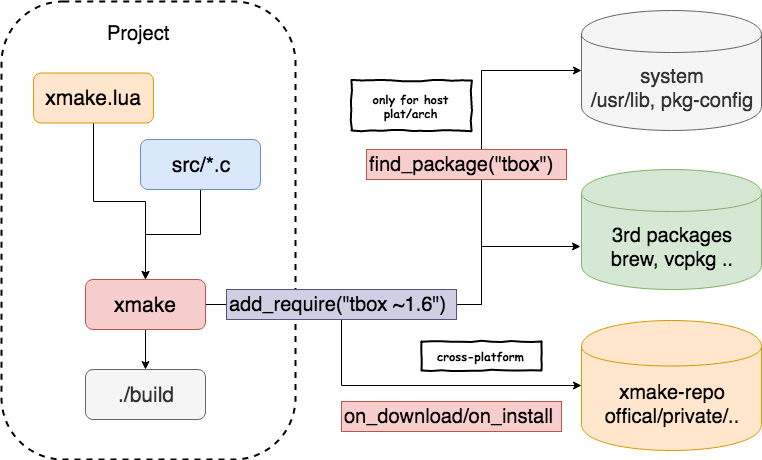
The following is the overall architecture and compilation process integrated with xmake.
## Introduction ([中文](/README_zh.md))
xrepo is a cross-platform C/C++ package manager based on [Xmake](https://github.com/xmake-io/xmake).
It is based on the runtime provided by xmake, but it is a complete and independent package management program. Compared with package managers such as vcpkg/homebrew, xrepo can provide C/C++ packages for more platforms and architectures at the same time.
And it also supports multi-version semantic selection. In addition, it is also a decentralized distributed repository. It not only provides the official [xmake-repo](https://github.com/xmake-io/xmake-repo) repository, It also supports users to build multiple private repositorys.
At the same time, xrepo also supports installing packages from third-party package managers such as vcpkg/homebrew/conan, and provides unified and consistent library link information to facilitate integration and docking with third-party projects.
If you want to know more, please refer to: [Documents](https://xrepo.xmake.io/#/getting_started), [Github](https://github.com/xmake-io/xrepo) and [Gitee](https://gitee.com/tboox/xrepo)

## Installation
We only need install xmake to use the xrepo command. About the installation of xmake, we can see: [Xmake Installation Document](https://xmake.io/#/guide/installation).
## Supported platforms
* Windows (x86, x64)
* macOS (i386, x86_64, arm64)
* Linux (i386, x86_64, cross-toolchains ..)
* *BSD (i386, x86_64)
* Android (x86, x86_64, armeabi, armeabi-v7a, arm64-v8a)
* iOS (armv7, armv7s, arm64, i386, x86_64)
* MSYS (i386, x86_64)
* MinGW (i386, x86_64, arm, arm64)
* Cross Toolchains
## Supported package repositories
* Official package repository [xmake-repo](https://github.com/xmake-io/xmake-repo) (tbox >1.6.1)
* [User-built repositories](https://xmake.io/#/package/remote_package?id=using-self-built-private-package-repository)
* Conan (conan::openssl/1.1.1g)
* Vcpkg (vcpkg:ffmpeg)
* Homebrew/Linuxbrew (brew::pcre2/libpcre2-8)
* Pacman on archlinux/msys2 (pacman::libcurl)
* Clib (clib::clibs/bytes@0.0.4)
* Dub (dub::log 0.4.3)
## Suppory distributed repository
In addition to directly retrieving the installation package from the official repository: [xmake-repo](https://github.com/xmake-io/xmake-repo).
We can also add any number of self-built repositories, and even completely isolate the external network, and only maintain the installation and integration of private packages on the company's internal network.
Just use the following command to add your own repository address:
```console
$ xrepo add-repo myrepo https://github.com/mygroup/myrepo
```
## Seamless integration with xmake project
```lua
add_requires("tbox >1.6.1", "libuv master", "vcpkg::ffmpeg", "brew::pcre2/libpcre2-8")
add_requires("conan::openssl/1.1.1g", {alias = "openssl", optional = true, debug = true})
target("test")
set_kind("binary")
add_files("src/*.c")
add_packages("tbox", "libuv", "vcpkg::ffmpeg", "brew::pcre2/libpcre2-8", "openssl")
```
The following is the overall architecture and compilation process integrated with xmake.
 ## Get started
### Installation package
#### Basic usage
```console
$ xrepo install zlib tbox
```
#### Install the specified version package
```console
$ xrepo install "zlib 1.2.x"
$ xrepo install "zlib >=1.2.0"
```
#### Install the specified platform package
```console
$ xrepo install -p iphoneos -a arm64 zlib
$ xrepo install -p android [--ndk=/xxx] zlib
$ xrepo install -p mingw [--mingw=/xxx] zlib
$ xrepo install -p cross --sdk=/xxx/arm-linux-musleabi-cross zlib
```
#### Install the debug package
```console
$ xrepo install -m debug zlib
```
#### Install the package with dynamic library
```console
$ xrepo install -k shared zlib
```
#### Install the specified configuration package
```console
$ xrepo install -f "vs_runtime='MD'" zlib
$ xrepo install -f "regex=true,thread=true" boost
```
#### Install packages from third-party package manager
```console
$ xrepo install brew::zlib
$ xrepo install vcpkg::zlib
$ xrepo install conan::zlib/1.2.11
$ xrepo install pacman:libpng
$ xrepo install dub:log
```
### Find the library information of the package
```console
$ xrepo fetch pcre2
{
{
linkdirs = {
"/usr/local/Cellar/pcre2/10.33/lib"
},
links = {
"pcre2-8"
},
defines = {
"PCRE2_CODE_UNIT_WIDTH=8"
},
includedirs = "/usr/local/Cellar/pcre2/10.33/include"
}
}
```
```console
$ xrepo fetch --ldflags openssl
-L/Users/ruki/.xmake/packages/o/openssl/1.1.1/d639b7d6e3244216b403b39df5101abf/lib -lcrypto -lssl
```
```console
$ xrepo fetch --cflags openssl
-I/Users/ruki/.xmake/packages/o/openssl/1.1.1/d639b7d6e3244216b403b39df5101abf/include
```
```console
$ xrepo fetch -p [iphoneos|android] --cflags "zlib 1.2.x"
-I/Users/ruki/.xmake/packages/z/zlib/1.2.11/df72d410e7e14391b1a4375d868a240c/include
```
```console
$ xrepo fetch --cflags --ldflags conan::zlib/1.2.11
-I/Users/ruki/.conan/data/zlib/1.2.11/_/_/package/f74366f76f700cc6e991285892ad7a23c30e6d47/include -L/Users/ruki/.conan/data/zlib/1.2.11/_/_/package/f74366f76f700cc6e991285892ad7a23c30e6d47/lib -lz
```
### Import and export packages
xrepo can quickly export the installed packages, including the corresponding library files, header files, and so on.
```console
$ xrepo export -o /tmp/output zlib
```
You can also import the previously exported installation package on other machines to implement package migration.
```console
$ xrepo import -i /xxx/packagedir zlib
```
### Search supported packages
```console
$ xrepo search zlib "pcr*"
zlib:
-> zlib: A Massively Spiffy Yet Delicately Unobtrusive Compression Library (in xmake-repo)
pcr*:
-> pcre2: A Perl Compatible Regular Expressions Library (in xmake-repo)
-> pcre: A Perl Compatible Regular Expressions Library (in xmake-repo)
```
In addition, you can now search for their packages from third-party package managers such as vcpkg, conan, conda, and apt. You only need to add the corresponding package namespace, for example:
```console
$ xrepo search vcpkg::pcre
The package names:
vcpkg::pcre:
-> vcpkg::pcre-8.44#8: Perl Compatible Regular Expressions
-> vcpkg::pcre2-10.35#2: PCRE2 is a re-working of the original Perl Compatible Regular Expressions library
```
```console
$ xrepo search conan::openssl
The package names:
conan::openssl:
-> conan::openssl/1.1.1g:
-> conan::openssl/1.1.1h:
```
### Show package environment information
```console
$ xrepo env --show luajit
{
OLDPWD = "/mnt/tbox",
HOME = "/home/ruki",
PATH = "/home/ruki/.xmake/packages/l/luajit/2.1.0-beta3/fbac76d823b844f0b91abf3df0a3bc61/bin:/tmp:/tmp/arm-linux-musleabi-cross/bin:~/.local/bin: /usr/local/sbin:/usr/local/bin:/usr/sbin:/usr/bin:/sbin:/bin",
TERM = "xterm",
PWD = "/mnt/xmake",
XMAKE_PROGRAM_DIR = "/mnt/xmake/xmake",
HOSTNAME = "e6edd61ff1ab",
LD_LIBRARY_PATH = "/home/ruki/.xmake/packages/l/luajit/2.1.0-beta3/fbac76d823b844f0b91abf3df0a3bc61/lib",
SHLVL = "1",
_ = "/mnt/xmake/scripts/xrepo.sh"
}
```
### Load package environment and run commands
```console
$ xrepo env luajit
LuaJIT 2.1.0-beta3 -- Copyright (C) 2005-2017 Mike Pall. http://luajit.org/
JIT: ON SSE2 SSE3 SSE4.1 BMI2 fold cse dce fwd dse narrow loop abc sink fuse
>
```
```console
$ xrepo env -b "luajit 2.x" luajit
$ xrepo env -p iphoneos -b "zlib,libpng,luajit 2.x" cmake ..
```
### Package virtual environment
#### Enter the virtual environment
We can customize some package configurations by adding the xmake.lua file in the current directory, and then enter the specific package virtual environment.
```lua
add_requires("zlib 1.2.11")
add_requires("python 3.x", "luajit")
```
```console
$ xrepo env shell
> python --version
> luajit --version
```
We can also configure and load the corresponding toolchain environment in xmake.lua, for example, load the VS compilation environment.
```lua
set_toolchains("msvc")
```
#### Manage virtual environments
We can use the following command to register the specified virtual environment configuration globally to the system for quick switching.
```console
$ xrepo env --add /tmp/base.lua
```
At this time, we have saved a global virtual environment called base, and we can view it through the list command.
```console
$ xrepo env --list
/Users/ruki/.xmake/envs:
-base
envs(1) found!
```
We can also delete it.
```console
$ xrepo env --remove base
```
#### Switch global virtual environment
If we register multiple virtual environments, we can also switch them quickly.
```console
$ xrepo env -b base shell
> python --version
```
Or directly load the specified virtual environment to run specific commands
```console
$ xrepo env -b base python --version
```
`xrepo env -b/--bind` is to bind the specified virtual environment. For more details, see: [#1762](https://github.com/xmake-io/xmake/issues/1762)
### Show the given package information
```console
$ xrepo info zlib
The package info of project:
require(zlib):
-> description: A Massively Spiffy Yet Delicately Unobtrusive Compression Library
-> version: 1.2.11
-> urls:
-> http://zlib.net/zlib-1.2.11.tar.gz
-> c3e5e9fdd5004dcb542feda5ee4f0ff0744628baf8ed2dd5d66f8ca1197cb1a1
-> https://downloads.sourceforge.net/project/libpng/zlib/1.2.11/zlib-1.2.11.tar.gz
-> c3e5e9fdd5004dcb542feda5ee4f0ff0744628baf8ed2dd5d66f8ca1197cb1a1
-> repo: xmake-repo https://gitee.com/tboox/xmake-repo.git master
-> cachedir: /Users/ruki/.xmake/cache/packages/2010/z/zlib/1.2.11
-> installdir: /Users/ruki/.xmake/packages/z/zlib/1.2.11/d639b7d6e3244216b403b39df5101abf
-> searchdirs:
-> searchnames: zlib-1.2.11.tar.gz
-> fetchinfo: 1.2.11, system
-> version: 1.2.11
-> links: z
-> linkdirs: /usr/local/Cellar/zlib/1.2.11/lib
-> includedirs: /usr/local/Cellar/zlib/1.2.11/include
-> platforms: iphoneos, mingw@windows, macosx, mingw@linux,macosx, android@linux,macosx, windows, linux
-> requires:
-> plat: macosx
-> arch: x86_64
-> configs:
-> debug: false
-> vs_runtime: MT
-> shared: false
-> configs:
-> configs (builtin):
-> debug: Enable debug symbols. (default: false)
-> shared: Enable shared library. (default: false)
-> cflags: Set the C compiler flags.
-> cxflags: Set the C/C++ compiler flags.
-> cxxflags: Set the C++ compiler flags.
-> asflags: Set the assembler flags.
-> vs_runtime: Set vs compiler runtime. (default: MT)
-> values: {"MT","MD"}
```
### Uninstall all packages
We can use the following command to batch uninstall and delete the installed packages, supporting pattern matching:
```bash
$ xrepo remove --all
$ xrepo remove --all zlib pcr*
```
## Contacts
* Email:[waruqi@gmail.com](mailto:waruqi@gmail.com)
* Homepage:[tboox.org](https://tboox.org)
* Community:[/r/xmake on reddit](https://www.reddit.com/r/xmake/)
* ChatRoom:[Char on telegram](https://t.me/tbooxorg), [Chat on gitter](https://gitter.im/xmake-io/xmake?utm_source=badge&utm_medium=badge&utm_campaign=pr-badge&utm_content=badge)
* Source Code:[Github](https://github.com/xmake-io/xmake), [Gitee](https://gitee.com/tboox/xmake)
* QQ Group: 343118190(Technical Support), 662147501
* Wechat Public: tboox-os
## Get started
### Installation package
#### Basic usage
```console
$ xrepo install zlib tbox
```
#### Install the specified version package
```console
$ xrepo install "zlib 1.2.x"
$ xrepo install "zlib >=1.2.0"
```
#### Install the specified platform package
```console
$ xrepo install -p iphoneos -a arm64 zlib
$ xrepo install -p android [--ndk=/xxx] zlib
$ xrepo install -p mingw [--mingw=/xxx] zlib
$ xrepo install -p cross --sdk=/xxx/arm-linux-musleabi-cross zlib
```
#### Install the debug package
```console
$ xrepo install -m debug zlib
```
#### Install the package with dynamic library
```console
$ xrepo install -k shared zlib
```
#### Install the specified configuration package
```console
$ xrepo install -f "vs_runtime='MD'" zlib
$ xrepo install -f "regex=true,thread=true" boost
```
#### Install packages from third-party package manager
```console
$ xrepo install brew::zlib
$ xrepo install vcpkg::zlib
$ xrepo install conan::zlib/1.2.11
$ xrepo install pacman:libpng
$ xrepo install dub:log
```
### Find the library information of the package
```console
$ xrepo fetch pcre2
{
{
linkdirs = {
"/usr/local/Cellar/pcre2/10.33/lib"
},
links = {
"pcre2-8"
},
defines = {
"PCRE2_CODE_UNIT_WIDTH=8"
},
includedirs = "/usr/local/Cellar/pcre2/10.33/include"
}
}
```
```console
$ xrepo fetch --ldflags openssl
-L/Users/ruki/.xmake/packages/o/openssl/1.1.1/d639b7d6e3244216b403b39df5101abf/lib -lcrypto -lssl
```
```console
$ xrepo fetch --cflags openssl
-I/Users/ruki/.xmake/packages/o/openssl/1.1.1/d639b7d6e3244216b403b39df5101abf/include
```
```console
$ xrepo fetch -p [iphoneos|android] --cflags "zlib 1.2.x"
-I/Users/ruki/.xmake/packages/z/zlib/1.2.11/df72d410e7e14391b1a4375d868a240c/include
```
```console
$ xrepo fetch --cflags --ldflags conan::zlib/1.2.11
-I/Users/ruki/.conan/data/zlib/1.2.11/_/_/package/f74366f76f700cc6e991285892ad7a23c30e6d47/include -L/Users/ruki/.conan/data/zlib/1.2.11/_/_/package/f74366f76f700cc6e991285892ad7a23c30e6d47/lib -lz
```
### Import and export packages
xrepo can quickly export the installed packages, including the corresponding library files, header files, and so on.
```console
$ xrepo export -o /tmp/output zlib
```
You can also import the previously exported installation package on other machines to implement package migration.
```console
$ xrepo import -i /xxx/packagedir zlib
```
### Search supported packages
```console
$ xrepo search zlib "pcr*"
zlib:
-> zlib: A Massively Spiffy Yet Delicately Unobtrusive Compression Library (in xmake-repo)
pcr*:
-> pcre2: A Perl Compatible Regular Expressions Library (in xmake-repo)
-> pcre: A Perl Compatible Regular Expressions Library (in xmake-repo)
```
In addition, you can now search for their packages from third-party package managers such as vcpkg, conan, conda, and apt. You only need to add the corresponding package namespace, for example:
```console
$ xrepo search vcpkg::pcre
The package names:
vcpkg::pcre:
-> vcpkg::pcre-8.44#8: Perl Compatible Regular Expressions
-> vcpkg::pcre2-10.35#2: PCRE2 is a re-working of the original Perl Compatible Regular Expressions library
```
```console
$ xrepo search conan::openssl
The package names:
conan::openssl:
-> conan::openssl/1.1.1g:
-> conan::openssl/1.1.1h:
```
### Show package environment information
```console
$ xrepo env --show luajit
{
OLDPWD = "/mnt/tbox",
HOME = "/home/ruki",
PATH = "/home/ruki/.xmake/packages/l/luajit/2.1.0-beta3/fbac76d823b844f0b91abf3df0a3bc61/bin:/tmp:/tmp/arm-linux-musleabi-cross/bin:~/.local/bin: /usr/local/sbin:/usr/local/bin:/usr/sbin:/usr/bin:/sbin:/bin",
TERM = "xterm",
PWD = "/mnt/xmake",
XMAKE_PROGRAM_DIR = "/mnt/xmake/xmake",
HOSTNAME = "e6edd61ff1ab",
LD_LIBRARY_PATH = "/home/ruki/.xmake/packages/l/luajit/2.1.0-beta3/fbac76d823b844f0b91abf3df0a3bc61/lib",
SHLVL = "1",
_ = "/mnt/xmake/scripts/xrepo.sh"
}
```
### Load package environment and run commands
```console
$ xrepo env luajit
LuaJIT 2.1.0-beta3 -- Copyright (C) 2005-2017 Mike Pall. http://luajit.org/
JIT: ON SSE2 SSE3 SSE4.1 BMI2 fold cse dce fwd dse narrow loop abc sink fuse
>
```
```console
$ xrepo env -b "luajit 2.x" luajit
$ xrepo env -p iphoneos -b "zlib,libpng,luajit 2.x" cmake ..
```
### Package virtual environment
#### Enter the virtual environment
We can customize some package configurations by adding the xmake.lua file in the current directory, and then enter the specific package virtual environment.
```lua
add_requires("zlib 1.2.11")
add_requires("python 3.x", "luajit")
```
```console
$ xrepo env shell
> python --version
> luajit --version
```
We can also configure and load the corresponding toolchain environment in xmake.lua, for example, load the VS compilation environment.
```lua
set_toolchains("msvc")
```
#### Manage virtual environments
We can use the following command to register the specified virtual environment configuration globally to the system for quick switching.
```console
$ xrepo env --add /tmp/base.lua
```
At this time, we have saved a global virtual environment called base, and we can view it through the list command.
```console
$ xrepo env --list
/Users/ruki/.xmake/envs:
-base
envs(1) found!
```
We can also delete it.
```console
$ xrepo env --remove base
```
#### Switch global virtual environment
If we register multiple virtual environments, we can also switch them quickly.
```console
$ xrepo env -b base shell
> python --version
```
Or directly load the specified virtual environment to run specific commands
```console
$ xrepo env -b base python --version
```
`xrepo env -b/--bind` is to bind the specified virtual environment. For more details, see: [#1762](https://github.com/xmake-io/xmake/issues/1762)
### Show the given package information
```console
$ xrepo info zlib
The package info of project:
require(zlib):
-> description: A Massively Spiffy Yet Delicately Unobtrusive Compression Library
-> version: 1.2.11
-> urls:
-> http://zlib.net/zlib-1.2.11.tar.gz
-> c3e5e9fdd5004dcb542feda5ee4f0ff0744628baf8ed2dd5d66f8ca1197cb1a1
-> https://downloads.sourceforge.net/project/libpng/zlib/1.2.11/zlib-1.2.11.tar.gz
-> c3e5e9fdd5004dcb542feda5ee4f0ff0744628baf8ed2dd5d66f8ca1197cb1a1
-> repo: xmake-repo https://gitee.com/tboox/xmake-repo.git master
-> cachedir: /Users/ruki/.xmake/cache/packages/2010/z/zlib/1.2.11
-> installdir: /Users/ruki/.xmake/packages/z/zlib/1.2.11/d639b7d6e3244216b403b39df5101abf
-> searchdirs:
-> searchnames: zlib-1.2.11.tar.gz
-> fetchinfo: 1.2.11, system
-> version: 1.2.11
-> links: z
-> linkdirs: /usr/local/Cellar/zlib/1.2.11/lib
-> includedirs: /usr/local/Cellar/zlib/1.2.11/include
-> platforms: iphoneos, mingw@windows, macosx, mingw@linux,macosx, android@linux,macosx, windows, linux
-> requires:
-> plat: macosx
-> arch: x86_64
-> configs:
-> debug: false
-> vs_runtime: MT
-> shared: false
-> configs:
-> configs (builtin):
-> debug: Enable debug symbols. (default: false)
-> shared: Enable shared library. (default: false)
-> cflags: Set the C compiler flags.
-> cxflags: Set the C/C++ compiler flags.
-> cxxflags: Set the C++ compiler flags.
-> asflags: Set the assembler flags.
-> vs_runtime: Set vs compiler runtime. (default: MT)
-> values: {"MT","MD"}
```
### Uninstall all packages
We can use the following command to batch uninstall and delete the installed packages, supporting pattern matching:
```bash
$ xrepo remove --all
$ xrepo remove --all zlib pcr*
```
## Contacts
* Email:[waruqi@gmail.com](mailto:waruqi@gmail.com)
* Homepage:[tboox.org](https://tboox.org)
* Community:[/r/xmake on reddit](https://www.reddit.com/r/xmake/)
* ChatRoom:[Char on telegram](https://t.me/tbooxorg), [Chat on gitter](https://gitter.im/xmake-io/xmake?utm_source=badge&utm_medium=badge&utm_campaign=pr-badge&utm_content=badge)
* Source Code:[Github](https://github.com/xmake-io/xmake), [Gitee](https://gitee.com/tboox/xmake)
* QQ Group: 343118190(Technical Support), 662147501
* Wechat Public: tboox-os