
Generate and edit PDF documents in your .NET applications using the open-source QuestPDF library and its C# Fluent API. Build invoices, reports and data exports with ease.
www.questpdf.com
Topics
#html #csharp #export #pdf #library #nuget #report #dotnetcore #dotnet #generation #invoice #document #form #generation
 MarcinZiabek
1ba01a1cf5
Fixed override value
MarcinZiabek
1ba01a1cf5
Fixed override value
|
3 年 前 | |
|---|---|---|
| .github | 4 年 前 | |
| QuestPDF | 3 年 前 | |
| QuestPDF.Examples | 3 年 前 | |
| QuestPDF.Previewer | 3 年 前 | |
| QuestPDF.Previewer.Examples | 3 年 前 | |
| QuestPDF.ReportSample | 3 年 前 | |
| QuestPDF.UnitTests | 3 年 前 | |
| Resources | 3 年 前 | |
| .editorconfig | 3 年 前 | |
| .gitignore | 5 年 前 | |
| CODE_OF_CONDUCT.md | 4 年 前 | |
| FUNDING.yml | 3 年 前 | |
| LICENSE | 5 年 前 | |
| QuestPDF.sln | 3 年 前 | |
| SECURITY.md | 4 年 前 | |
| global.json | 3 年 前 | |
| readme.md | 3 年 前 |
readme.md






QuestPDF is an open-source .NET library for PDF documents generation.
It offers a layouting engine designed with a full paging support in mind. The document consists of many simple elements (e.g. border, background, image, text, padding, table, grid etc.) that are composed together to create more complex structures. This way, as a developer, you can understand the behavior of every element and use them with full confidence. Additionally, the document and all its elements support paging functionality. For example, an element can be moved to the next page (if there is not enough space) or even be split between pages like table's rows.
Unlike other libraries, it does not rely on the HTML-to-PDF conversion which in many cases is not reliable. Instead, it implements its own layouting engine that is optimized to cover all paging-related requirements.
Please show the value
Choosing a project dependency could be difficult. We need to ensure stability and maintainability of our projects. Surveys show that GitHub stars count play an important factor when assessing library quality.
⭐ Please give this repository a star. It takes seconds and help thousands of developers! ⭐

Please share with the community
As an open-source project without funding, I cannot afford advertising QuestPDF in a typical way. Instead, the library relies on community interactions. Please consider sharing a post about QuestPDF and the value it provides. It really does help!





Support development
It doesn't matter if you are a professional developer, creating a startup or work for an established company. All of us care about our tools and dependencies, about stability and security, about time and money we can safe, about quality we can offer. Please consider sponsoring QuestPDF to give me an extra motivational push to develop the next great feature.
If you represent a company and want to help the entire community, please consider sponsoring QuestPDF using one of the higher tiers. All developers will see your company logo and the description of your choice. It is a fantastic way to build a strong relationship with the community, show that you care, or even find the best professionals. The truth is, no classical advertisement campaign is as effective as real engagement.
Special thanks to all companies that decided to sponsor QuestPDF development. This makes .NET ecosystem a better place for all developers and businesses!
| Company | Description |
|---|---|
 |
JetBrains supports this project as part of the OSS Power-Ups program. Thank you! 100$ / month |

Installation
The library is available as a nuget package. You can install it as any other nuget package from your IDE, try to search by QuestPDF. You can find package details on this webpage.
// Package Manager
Install-Package QuestPDF

// .NET CLI
dotnet add package QuestPDF

// Package reference in .csproj file
<PackageReference Include="QuestPDF" Version="2022.6.0" />

Documentation



QuestPDF Previewer
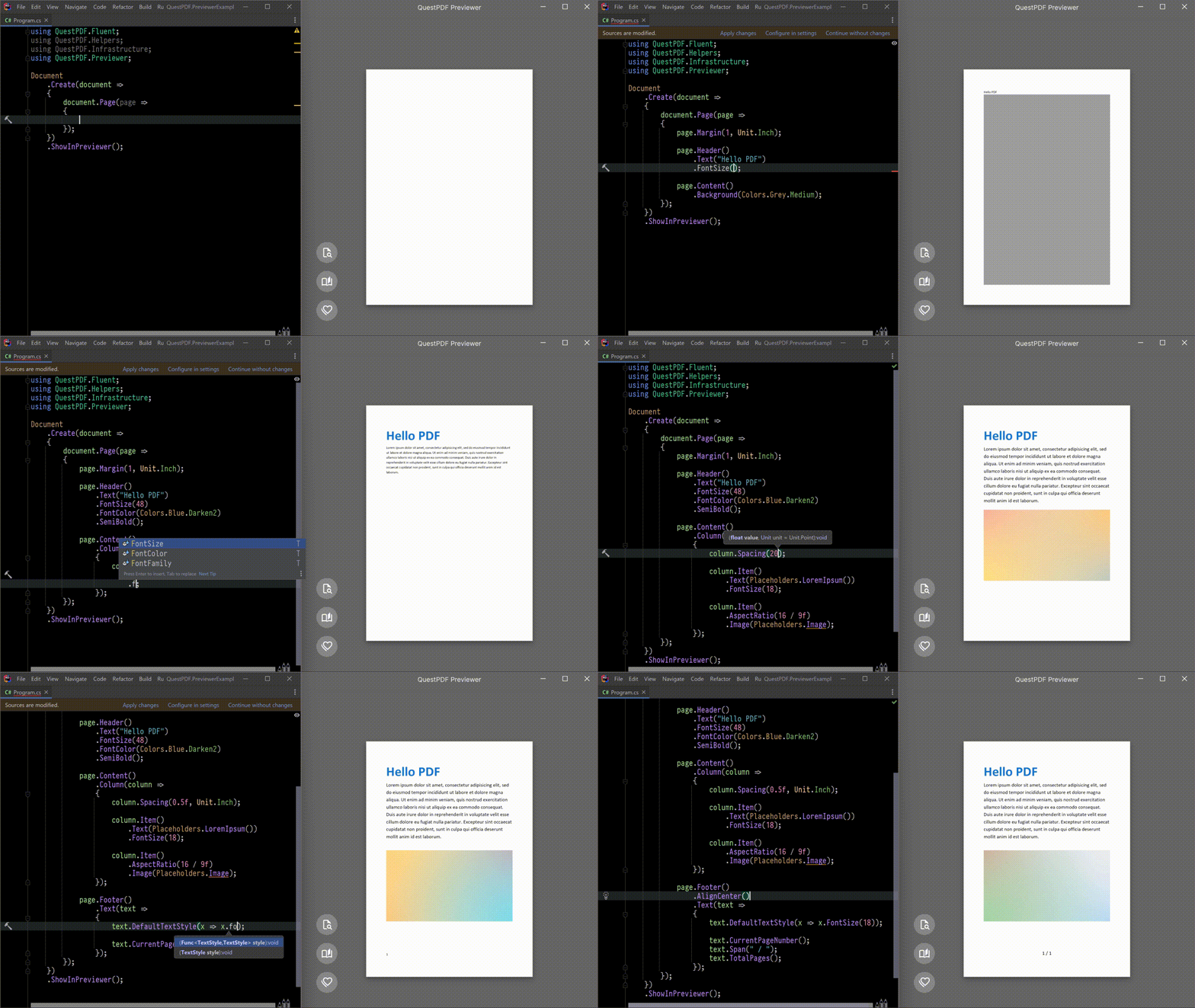
The QuestPDF Previewer is a tool designed to simplify and speed up your development lifecycle. First, it shows a preview of your document. But the real magic starts with the hot-reload capability! It observes your code and updates the preview every time you change the implementation. Get real-time results without the need of code recompilation. Save time and enjoy the task!

Simplicity is the key
How easy it is to start and prototype with QuestPDF? Really easy thanks to its minimal API! Please analyse the code below:
using QuestPDF.Fluent;
using QuestPDF.Helpers;
using QuestPDF.Infrastructure;

// code in your main method
Document.Create(container =>
{
    container.Page(page =>
    {
        page.Size(PageSizes.A4);
        page.Margin(2, Unit.Centimetre);
        page.PageColor(Colors.White);
        page.DefaultTextStyle(x => x.FontSize(20));

        page.Header()
            .Text("Hello PDF!")
            .SemiBold().FontSize(36).FontColor(Colors.Blue.Medium);

        page.Content()
            .PaddingVertical(1, Unit.Centimetre)
            .Column(x =>
            {
                x.Spacing(20);

                x.Item().Text(Placeholders.LoremIpsum());
                x.Item().Image(Placeholders.Image(200, 100));
            });

        page.Footer()
            .AlignCenter()
            .Text(x =>
            {
                x.Span("Page ");
                x.CurrentPageNumber();
            });
    });
})
.GeneratePdf("hello.pdf");
And compare it to the produced PDF file:

Are you ready for more?
The Fluent API of QuestPDF scales really well. It is easy to create and maintain even most complex documents. Read the Getting started tutorial to learn QuestPDF basics and implement an invoice under 200 lines of code. You can also investigate and play with the code from the example repository.

QuestPDF on JetBrains OSS Power-Ups
QuestPDF was presented on one of the episodes of OSS Power-Ups hosted by JetBrains. Huge thanks for Matthias Koch and entire JetBrains team for giving me a chance to show QuestPDF. You are the best!
<img src="https://github.com/QuestPDF/QuestPDF-Documentation/blob/main/docs/public/jetbrains-oss-powerups-youtube.png?raw=true" width="600px">
