
Archived project to wrap the Urho3D engine for C#, allowing it to be used on any .net core (NetStandard 2.0+ ie .net6/7/8) runtime and is fully mobile supported.
 EgorBo
050fdf9943
workaround for "bundling resource into ns2.0 with xamarin.ios10 doesn't work"
EgorBo
050fdf9943
workaround for "bundling resource into ns2.0 with xamarin.ios10 doesn't work"
|
hace 7 años | |
|---|---|---|
| Bindings | hace 7 años | |
| Docs | hace 7 años | |
| Extensions | hace 7 años | |
| Nuget | hace 7 años | |
| ProjectTemplates | hace 8 años | |
| Samples @ f1bcec78cf | hace 8 años | |
| Screenshots | hace 8 años | |
| SharpieBinder | hace 7 años | |
| Tests | hace 7 años | |
| Urho3D | hace 7 años | |
| docs | hace 8 años | |
| .gitignore | hace 8 años | |
| .gitmodules | hace 10 años | |
| LICENSE | hace 10 años | |
| MakeAndroid | hace 8 años | |
| MakeLinux | hace 7 años | |
| MakeMac | hace 7 años | |
| MakeSharpReality | hace 8 años | |
| MakeSharpReality.bat | hace 8 años | |
| MakeUWP | hace 8 años | |
| MakeUWP.bat | hace 7 años | |
| MakeWindows | hace 8 años | |
| MakeWindows.bat | hace 7 años | |
| MakeWindowsAll.bat | hace 8 años | |
| Makefile | hace 7 años | |
| MakeiOS | hace 7 años | |
| README.md | hace 7 años | |
| Urho.sln | hace 7 años | |
| UrhoSharp.png | hace 10 años |

README.md
#  UrhoSharp

UrhoSharp is a lightweight Game Engine suitable for using with C# and F# to create games and 3D applications. The game engine is available as a NETStandard 2.0 library, allowing your game code to be written once and shared across all platforms. UrhoSharp is powered by Urho3D, a game engine that has been under development for more than a decade. More information can be found in the UrhoSharp documentation. The bindings for Urho3D are licensed under the MIT license, as found on the LICENSE file.
Key advantages:
- Lightweight - ~10mb per platform including basic assets
- Embeddable - can be embedded into any app as a subview (UIView, NSView, Panel, etc).
- Open-source - C# bindings and the underlying C++ engine Urho3D are licensed under the MIT License
- Powerful 3rd parties - Bullet, Box2D, Recast/Detour, kNet, FreeType
- Advanced graphics using physically based rendering (PBR), Skeletal animation, Inverse Kinematics etc
- Simple code-first approach (however, it still supports native Urho3D editor)
Supported platforms:
- Windows, WPF, WinForms (net45)
- iOS (xamarin.ios10)
- macOS
- Android (monodroid81)
- UWP (uap10.0.16299)
- AR: HoloLens, ARKit, ARCore
- Mixed Reality
- Xamarin.Forms (iOS, Android, UWP)
- Ubuntu


Samples
Sample code lives in https://github.com/xamarin/urho-samples and repository has them as a git submodule. Samples use UrhoSharp via nuget.
Setup
Available on NuGet:
- UrhoSharp - the main package, contains implementations for all platforms including native binaries and basic assets
- UrhoSharp.Tools - contains compiled binaries for AssetImporter and PackageTool for Windows and macOS
- UrhoSharp.WinForms - WinForms control
- UrhoSharp.WPF - WPF control
- UrhoSharp.Cocoa - Cocoa control (macOS)
- UrhoSharp.Forms - Xamarin.Forms support for iOS, Android and UWP
- UrhoSharp.SharpReality - HoloLens and Mixed Reality platforms
- UrhoSharp.HoloLens - deprecated. Was renamed to UrhoSharp.SharpReality
Quick start
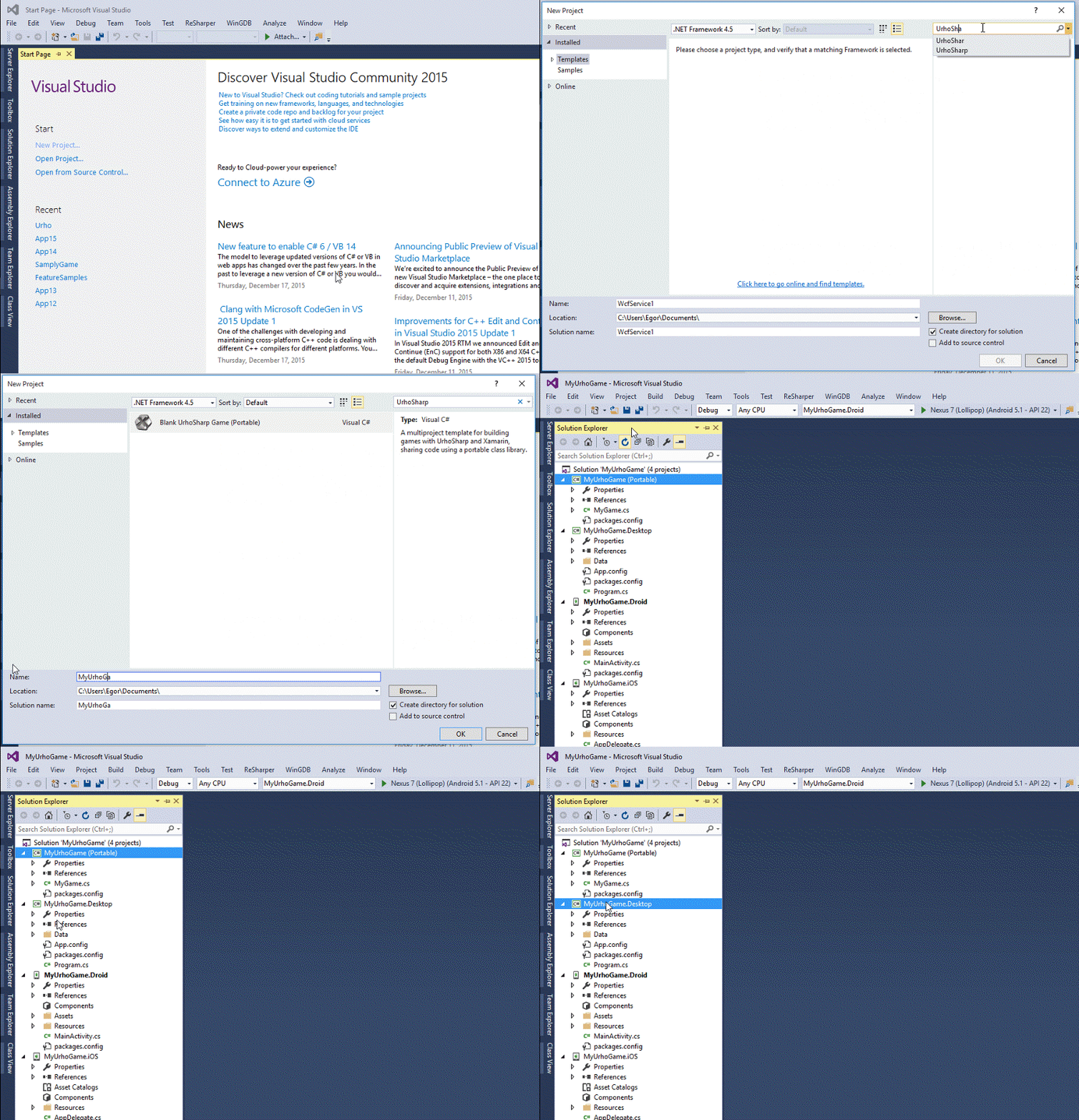
To help developers get up and running quickly with UrhoSharp we are providing a solution template for Visual Studio (you can find it in "Online templates" tab). This template consists of PCL+Android+iOS+Mac/Windows with a simple scene and some assets (Xamarin Studio templates will be available soon):
How to build bindings
This is currently a little messy, so YMMV.
In order to compile binaries for all platforms you will need both Windows and OS X environment. Please follow these steps:
Compile UrhoSharp on macOS
You will need:
- XCode
- Visual Studio for Mac
- CMake (
brew install cmake) - Command Line tools (
xcode-select --install) - Android NDK + ANDROID_NDK_HOME environment variable
NOTE:
UrhoSharp.csprojandUrhoSharp.Forms.csprojare SDK-style NETStandard2.0 projects with multi-targeting, unfortunately Visual Studio for Mac currently doesn't fully support such projects so you have to compile them usingmsbuildCLI, e.g.cd Bindings/Forms && msbuild /restore UrhoSharp.Forms.csproj /p:Configuration=Release /p:Platform=AnyCpu
1. Clone the repository including submodules
git clone [email protected]:xamarin/urho.git --recursive
2. Compile Urho.pch, SharpieBinder and generate bindigs
The following command will download Clang 3.7.0 if you do not have it installed, and use this to scan the Urho header files, then compile the sources to PCH, parse it via SharpieBinder and generate C# bindings. Additionally there is a perl script to generate bindings to Urho3D events.
make Generated
3. Compile UrhoSharp for Mac (fat dylib)
make Mac
it usually takes 5-10 minutes.
4. Compile UrhoSharp for iOS (fat dylib: i386, x86_64, armv7, arm64)
make iOS SDK_VER=12.1
5. Compile UrhoSharp for Android (armeabi, armeabi-v7a, arm64, x86, x86_64)
make -j5 Android
-j5 means a job per ABI. Make sure you have installed Android SDK and NDK (see MakeAndroid file) This target can also be executed on Windows.
Compile UrhoSharp on Windows
Obviously you can't do it on OS X so you have to switch to Windows environment. Make sure you have installed:
You will need:
- Visual Studio 2017
- CMake 3.10
Open "Command Prompt for Visual Studio" (or regular CMD with msbuild.exe added to the PATH) Go to the project root directory and execute
MakeWindows.bat x64 Release 2017 OpenGL
All compiled binaries could be found in the Bin/{platform} folder. You can also change the parameters, for example the following command:
MakeWindows.bat x86 Debug 2017 DirectX
Compiles debug version of mono-urho.dll with DirectX as a backend.
Compile UrhoSharp on Linux*
Special thanks to @aktowns Prerequisites for Ubuntu 16.06
sudo apt-get install cmake clang-3.7 avr-libc libglew-dev libsdl2-dev libsdl2-image-dev libglm-dev libfreetype6-dev libgl1-mesa-dev libx11-dev
Then just execute:
make Linux
*Tested on Ubuntu 16.06, Fedora 25 and WSL
Updating Documentation
Once you have a build, run the refresh-docs target, like this:
make refresh-docs
This will update the documentation based on the API changes. Then you can use a tool like DocWriter [1] on the Mac to edit the contents, or just edit the ECMA XML documentation by hand with an XML editor.