
🎨 Cross-platform image editor with raster and vector layers similar to Paint.Net written in Lazarus (Free Pascal)
#drawing #art-tool #utility #paint #paint.net #paintdotnet #freepascal #lazarus #fpc #pascal #2d #desktop
 circular17
365ba1b35a
Merge pull request #622 from bgrabitmap/dependabot/github_actions/actions/checkout-6
circular17
365ba1b35a
Merge pull request #622 from bgrabitmap/dependabot/github_actions/actions/checkout-6
|
2 месяцев назад | |
|---|---|---|
| .github | 2 месяцев назад | |
| lazpaint | 5 месяцев назад | |
| lazpaintcontrols | 11 месяцев назад | |
| resources | 8 месяцев назад | |
| use | 8 месяцев назад | |
| vectoredit | 5 лет назад | |
| web | 8 месяцев назад | |
| winmake | 5 лет назад | |
| .gitignore | 8 месяцев назад | |
| .gitmodules | 8 месяцев назад | |
| COPYING.txt | 5 лет назад | |
| Makefile | 3 лет назад | |
| README.md | 2 лет назад | |
| _config.yml | 1 год назад | |
| commit.sh | 6 лет назад | |
| configure | 5 лет назад | |
| configure.bat | 5 лет назад | |
| create_orig | 5 лет назад | |
| lazpaint.logic | 3 лет назад | |
| prune_lpk | 5 лет назад |
README.md
LazPaint
Free cross-platform image editor, like PaintBrush or Paint.Net, written in Lazarus (Free Pascal). Uses BGRABitmap library.
You can support the development by donating. That will allow the developper to buy carrots and beans for sustenance.
Download
Download LazPaint for Windows, Mac and Linux. The application is also available in some Linux repositories.
This application can be made portable.
Here are compilation instructions if you would like to debug or make a modified version.
Official Sites
Screenshots
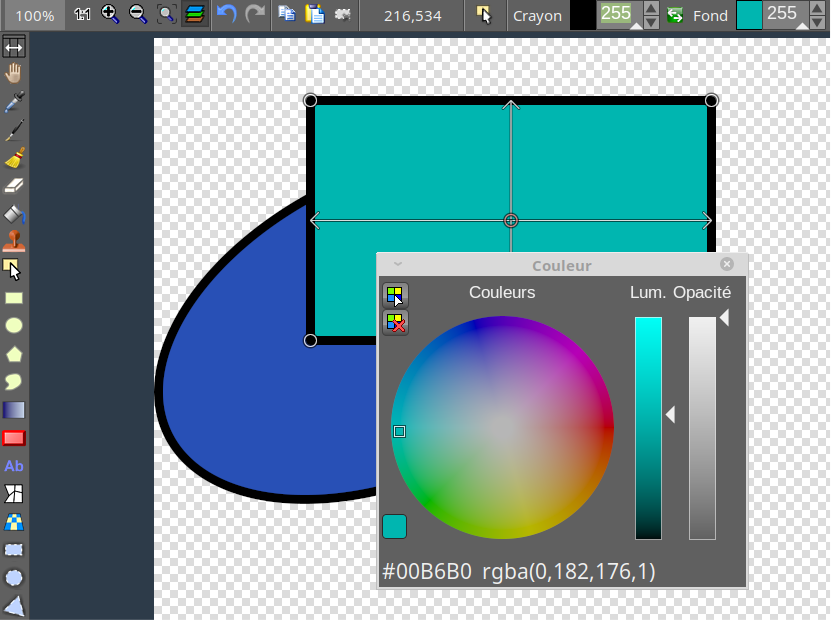


History
LazPaint was started to demonstrate the capabilities of the graphic library BGRABitmap. It provides advanced drawing functions in Lazarus development environment. Both provided a source of inspiration for the other and finally LazPaint became real image editor. Thanks to the help of Lazarus community, the program has been compiled on Windows, Linux, MacOS X, FreeBSD and Raspberry Pi.
Features
- Files: read and write a variety of file formats, including layered bitmaps and 3D files.
- Tools: many tools are available to draw on the layers.
- Edit/Select: select parts of an image with antialiasing and modify the selection as a mask.
- View: color window, layer stack window and toolbox window.
- Command line: call LazPaint from a console.
Useful keys
- Maintaining Space key down switches temporarily in move mode
- F6 key hides/shows all tool windows
- Ctrl key aligns to image pixels and limits possible angles with rotation tool
- Backspace key erases last point in a polygon or last letter in a text
- Enter key releases the selection Right mouse button can be used to:
- Swap drawing colors temporarily
- Subtract from selection (selection tool)
- Define light position (shaded text, shaded shapes)
- Finish a shape (polygon, curve)
Interface
Many common actions can be done with the toolbar. Zoom can be changed with the magnifying glass (+ or -), or by clicking on the 1:1 button to show the image at its original size in pixels, or with the zoom fit button to set the zoom so that the whole image be within the window. It is possible to undo/redo the 200 last operations. If you have a doubt on what you are drawing, undo back to the beginning, save a copy, and redo the modifications before going further.
Dark theme is supported.
Image manipulation
An image can be resampled, flipped horizontally and vertically, canvas size can be changed
- Remove transparency : fill the transparent pixels of the image
- Flatten : reduce a layered image to one single layer
- Smart zoom x3 : resize the image x3 and detects borders; this provides a useful zoom with ancient games sprites.
Color manipulation
- Curves : adjustment of curves for RGB and HSL channels
- Posterize : reduce the number of colors by lightness or independently on each color channel
- Colorize : set the color of an image while preserving intensities
- Shift colors : cycle colors and change colorness (saturation)
- Intensity : make colors lighter or darker without making them white
- Lightness : make colors lighter or darker by making them whiter
- Normalize : use the whole range of each color channel and alpha channel
- Negative : invert colors (with gamma correction)
- Linear negative : invert colors (without gamma correction)
- Grayscale : converts colors to grayscale with gamma correction
Filters
Filters can be applied to the whole image or to the active selection.
- Radial blur : non directional blur (box, gaussian, corona...)
- Motion blur : directional blur
- Custom blur : blur according to a mask
- Sharpen : makes contours more accute, complementary to Smooth
- Smooth : softens whole image, complementary to Sharpen
- Noise : add random pixel noise
- Median : computes the median of colors around each pixel, which softens corners
- ClearType : mimics the effect of TrueType font rendering
- Apply function : applies any given function to any channel (RGB, HSL, Lab)
- Contour : draws contours on a white background (like a pencil drawing)
- Emboss : draws contours with shadow
- Shaded map : draw Phong highlights and shadows using a channel of the image as altitude
- Sphere : spherical projection
- Twirl : Distorts the image as a vortex
- Wave displacement : Distorts as if reflected on waves
- Cylinder : cylinder projection
Render
- Perlin noise : random image that can be used to make Nature-like randomness
- Cyclic Perlin noise : same but with cyclic behavior
- Water, snow print, wood, metal, stone, marble... : generate random texture
- Clouds : add clouds of the current pen color
- Rain : add rain falling with custom wind
Layer effect (via scripts)
- Color overlay : replace the color
- Drop shadow : add a shadow layer
- Inner light, inner shadow : add lighting layer depending on the border (according to transparency)
- Stroke : add a layer to draw a stroke around the shape (according to transparency)