
Mirror of the ArchivalBox software source repository. Useful for storing snapshots of web pages and their resources for offline viewing or preservation.
#archival #utilities #python #webpage #web-archival #web-snapshot #storage
 Nick Sweeting
726bcabd82
fix iterator missing chunk_size
Nick Sweeting
726bcabd82
fix iterator missing chunk_size
|
1 year ago | |
|---|---|---|
| .github | 1 year ago | |
| archivebox | 1 year ago | |
| bin | 1 year ago | |
| brew_dist @ ec64946796 | 2 years ago | |
| deb_dist @ 92f8fe8f34 | 2 years ago | |
| docker @ 1fc6dd7f0f | 2 years ago | |
| docs @ f23abba977 | 1 year ago | |
| etc | 2 years ago | |
| pip_dist @ 1380be7e4e | 1 year ago | |
| tests | 1 year ago | |
| website | 2 years ago | |
| .dockerignore | 1 year ago | |
| .gitattributes | 1 year ago | |
| .gitignore | 1 year ago | |
| .gitmodules | 1 year ago | |
| .npmignore | 5 years ago | |
| .readthedocs.yaml | 2 years ago | |
| Dockerfile | 1 year ago | |
| LICENSE | 5 years ago | |
| README.md | 1 year ago | |
| SECURITY.md | 2 years ago | |
| docker-compose.yml | 1 year ago | |
| package-lock.json | 1 year ago | |
| package.json | 1 year ago | |
| pdm.lock | 1 year ago | |
| pyproject.toml | 1 year ago | |
| requirements.txt | 1 year ago |
README.md

ArchiveBox
Open-source self-hosted web archiving.
▶️ Quickstart | Demo | GitHub | Documentation | Info & Motivation | Community






**ArchiveBox is a powerful, self-hosted internet archiving solution to collect, save, and view websites offline.** Without active preservation effort, everything on the internet eventually dissapears or degrades. Archive.org does a great job as a centralized service, but saved URLs have to be public, and they can't save every type of content. *ArchiveBox is an open source tool that lets organizations & individuals archive both public & private web content while retaining control over their data. It can be used to save copies of bookmarks, preserve evidence for legal cases, backup photos from FB/Insta/Flickr or media from YT/Soundcloud/etc., save research papers, and more...*
> ➡️ Get ArchiveBox with `pip install archivebox` on [Linux](#quickstart), [macOS](#quickstart), and [Windows](#quickstart) (WSL2), or via **[Docker](#quickstart)** ⭐️. *Once installed, it can be used as a [CLI tool](#usage), [self-hosted Web App](https://github.com/ArchiveBox/ArchiveBox/wiki/Publishing-Your-Archive), [Python library](https://github.com/ArchiveBox/ArchiveBox/wiki/Usage#python-shell-usage), or [one-off command](#static-archive-exporting).*
📥 **You can feed ArchiveBox URLs one at a time, or schedule regular imports** from your bookmarks or history, social media feeds or RSS, link-saving services like Pocket/Pinboard, our [Browser Extension](https://github.com/ArchiveBox/archivebox-browser-extension), and more. See Input Formats for a full list of supported input formats...
🛠️ ArchiveBox uses [standard tools](#dependencies) like Chrome, [`wget`](https://www.gnu.org/software/wget/), & [`yt-dlp`](https://github.com/yt-dlp/yt-dlp), and stores data in [ordinary files & folders](#archive-layout). *(no complex proprietary formats, all data is readable without needing to run ArchiveBox)* The goal is to sleep soundly knowing the part of the internet you care about will be automatically preserved in durable, easily accessible formats [for decades](#background--motivation) after it goes down.
**📦 Install ArchiveBox using your preferred method: `docker` / `pip` / `apt` / etc. ([see full Quickstart below](#quickstart)).**
Expand for quick copy-pastable install commands... ⤵️
# Option A: Get ArchiveBox with Docker Compose (recommended):
mkdir -p ~/archivebox/data && cd ~/archivebox
curl -fsSL 'https://docker-compose.archivebox.io' > docker-compose.yml   # edit options in this file as-needed
docker compose run archivebox init --setup
# docker compose run archivebox add 'https://example.com'
# docker compose run archivebox help
# docker compose up


# Option B: Or use it as a plain Docker container:
mkdir -p ~/archivebox/data && cd ~/archivebox/data
docker run -it -v $PWD:/data archivebox/archivebox init --setup
# docker run -it -v $PWD:/data archivebox/archivebox add 'https://example.com'
# docker run -it -v $PWD:/data archivebox/archivebox help
# docker run -it -v $PWD:/data -p 8000:8000 archivebox/archivebox


# Option C: Or install it with your preferred pkg manager (see Quickstart below for apt, brew, and more)
pip install archivebox
mkdir -p ~/archivebox/data && cd ~/archivebox/data
archivebox init --setup
# archivebox add 'https://example.com'
# archivebox help
# archivebox server 0.0.0.0:8000


# Option D: Or use the optional auto setup script to install it
curl -fsSL 'https://get.archivebox.io' | sh
Open
http://localhost:8000 to see your server's Web UI ➡️
Key Features
- Free & open source, own your own data & maintain your privacy by self-hosting
- Powerful CLI with modular dependencies and support for Google Drive/NFS/SMB/S3/B2/etc.
- Comprehensive documentation, active development, and rich community
- Extracts a wide variety of content out-of-the-box: media (yt-dlp), articles (readability), code (git), etc.
- Supports scheduled/realtime importing from many types of sources
- Uses standard, durable, long-term formats like HTML, JSON, PDF, PNG, MP4, TXT, and WARC
- Usable as a oneshot CLI, self-hosted web UI, Python API (BETA), REST API (ALPHA), or desktop app
- Saves all pages to archive.org as well by default for redundancy (can be disabled for local-only mode)
- Advanced users: support for archiving content requiring login/paywall/cookies (see wiki security caveats!)
- Planned: support for running JS during archiving to adblock, autoscroll, modal-hide, thread-expand
🤝 Professional Integration
ArchiveBox is free for everyone to self-host, but we also provide support, security review, and custom integrations to help NGOs, governments, and other organizations run ArchiveBox professionally:
- Journalists:
crawling during research,preserving cited pages,fact-checking & review - Lawyers:
collecting & preserving evidence,detecting changes,tagging & review - Researchers:
analyzing social media trends,getting LLM training data,crawling pipelines - Individuals:
saving bookmarks,preserving portfolio content,legacy / memoirs archival - Governments:
snapshoting public service sites,recordkeeping compliance
*Contact us if your org wants help using ArchiveBox professionally.* (we are also seeking grant funding)
We offer: setup & support, CAPTCHA/ratelimit unblocking, SSO, audit logging/chain-of-custody, and more
ArchiveBox is a 🏛️ 501(c)(3) nonprofit FSP and all our work supports open-source development.
Quickstart
🖥 Supported OSs: Linux/BSD, macOS, Windows (Docker) 👾 CPUs: amd64 (x86_64), arm64, arm7 (raspi>=3)
✳️ Easy Setup

docker-compose (macOS/Linux/Windows) 👈 recommended (click to expand)
👍 Docker Compose is recommended for the easiest install/update UX + best security + all extras out-of-the-box.
- Install Docker on your system (if not already installed).
- Download the
docker-compose.ymlfile into a new empty directory (can be anywhere).mkdir -p ~/archivebox/data && cd ~/archivebox # Read and edit docker-compose.yml options as-needed after downloading curl -fsSL 'https://docker-compose.archivebox.io' > docker-compose.yml - Run the initial setup to create an admin user (or set ADMIN_USER/PASS in docker-compose.yml)
docker compose run archivebox init --setup - Next steps: Start the server then login to the Web UI http://127.0.0.1:8000 ⇢ Admin.
For more info, see Install: Docker Compose in the Wiki. ➡️docker compose up # completely optional, CLI can always be used without running a server # docker compose run [-T] archivebox [subcommand] [--help] docker compose run archivebox add 'https://example.com' docker compose run archivebox help
docker run (macOS/Linux/Windows)
- Install Docker on your system (if not already installed).
- Create a new empty directory and initialize your collection (can be anywhere).
mkdir -p ~/archivebox/data && cd ~/archivebox/data docker run -v $PWD:/data -it archivebox/archivebox init --setup - Optional: Start the server then login to the Web UI http://127.0.0.1:8000 ⇢ Admin.
For more info, see Install: Docker Compose in the Wiki. ➡️docker run -v $PWD:/data -p 8000:8000 archivebox/archivebox # completely optional, CLI can always be used without running a server # docker run -v $PWD:/data -it [subcommand] [--help] docker run -v $PWD:/data -it archivebox/archivebox help

bash auto-setup script (macOS/Linux)
- Install Docker on your system (optional, highly recommended but not required).
- Run the automatic setup script.
For more info, see Install: Bare Metal in the Wiki. ➡️curl -fsSL 'https://get.archivebox.io' | sh
See
setup.sh for the source code of the auto-install script.See "Against curl | sh as an install method" blog post for my thoughts on the shortcomings of this install method.
🛠 Package Manager Setup

pip (macOS/Linux/BSD)
- Install Python >= v3.10 and Node >= v18 on your system (if not already installed).
- Install the ArchiveBox package using
pip3(orpipx).
See the Install: Bare Metal Wiki for full install instructions for each OS...pip3 install --upgrade archivebox yt-dlp playwright playwright install --with-deps chromium archivebox version # install any missing extras shown using apt/brew/pkg/etc. see Wiki for instructions # [email protected] node curl wget git ripgrep ... - Create a new empty directory and initialize your collection (can be anywhere).
mkdir -p ~/archivebox/data && cd ~/archivebox/data # for example archivebox init --setup # instantialize a new collection # (--setup auto-installs and link JS dependencies: singlefile, readability, mercury, etc.) - Optional: Start the server then login to the Web UI http://127.0.0.1:8000 ⇢ Admin.
archivebox server 0.0.0.0:8000
# completely optional, CLI can always be used without running a server
# archivebox [subcommand] [--help]
archivebox help
See the
pip-archivebox repo for more details about this distribution.


brew (macOS only)
- Install Homebrew on your system (if not already installed).
- Install the ArchiveBox package using
brew.
See the Install: Bare Metal Wiki for more granular instructions for macOS... ➡️brew tap archivebox/archivebox brew install archivebox # update to newest version with pip (sometimes brew package is outdated) pip install --upgrade --ignore-installed archivebox yt-dlp playwright playwright install --with-deps chromium # install chromium and its system dependencies archivebox version # make sure all dependencies are installed - Create a new empty directory and initialize your collection (can be anywhere).
mkdir -p ~/archivebox/data && cd ~/archivebox/data archivebox init --setup - Optional: Start the server then login to the Web UI http://127.0.0.1:8000 ⇢ Admin.
archivebox server 0.0.0.0:8000
# completely optional, CLI can always be used without running a server
# archivebox [subcommand] [--help]
archivebox help
See the
homebrew-archivebox repo for more details about this distribution.

pacman / 
pkg / 
nix (Arch/FreeBSD/NixOS/more)
> *Warning: These are contributed by external volunteers and may lag behind the official `pip` channel.*
- Arch:
yay -S archivebox(contributed by@imlonghao) - FreeBSD:
curl -fsSL 'https://get.archivebox.io' | sh(usespkg+pip3under-the-hood) - Nix:
nix-env --install archivebox(contributed by@siraben) - Guix:
guix install archivebox(contributed by@rakino) - More: contribute another distribution...!
🎗 Other Options
docker + 
electron Desktop App (macOS/Linux/Windows)
- Install Docker on your system (if not already installed).
- Download a binary release for your OS or build the native app from source
- macOS:
ArchiveBox.app.zip - Linux:
ArchiveBox.deb(alpha: build manually) - Windows:
ArchiveBox.exe(beta: build manually)
- macOS:
✨ Alpha (contributors wanted!): for more info, see the: Electron ArchiveBox repo.
 TrueNAS / UNRAID / YunoHost / Cloudron / etc. (self-hosting solutions)
> *Warning: These are contributed by external volunteers and may lag behind the official `pip` channel.*
TrueNAS: Official ArchiveBox TrueChart / Custom App Guide(TrueCharts is discontinued, wait for Electric Eel)- UnRaid
- Yunohost
- Cloudron
- Saltbox
- Portainer
- AppImage
- Runtipi
- Umbrel (need contributors...)
- More: contribute another distribution...!
 Paid hosting solutions (cloud VPS)
-
 (get hosting, support, and feature customization directy from us)
 -
 (generalist consultancy that has ArchiveBox experience)
 (USD $29-250/mo, pricing)
 (from USD $2.6/mo)
-
 (USD $5-50+/mo, 🎗 referral link, instructions)
 -
 (USD $2.5-50+/mo, 🎗 referral link, instructions)
 -
 (USD $10-50+/mo, instructions)
 -
 (USD $0-5+/mo)
  (USD $60-200+/mo)
 (USD $60-200+/mo)
Other providers of paid ArchiveBox hosting (not officially endorsed):
Referral links marked 🎗 provide $5-10 of free credit for new users and help pay for our demo server hosting costs.
➡️ Next Steps
- Import URLs from some of the supported Input Formats or view the supported Output Formats...
- Tweak your UI or archiving behavior Configuration, read about some of the Caveats, or Troubleshoot
- Read about the Dependencies used for archiving, the Upgrading Process, or the Archive Layout on disk...
- Or check out our full Documentation or Community Wiki...
Usage
⚡️ CLI Usage
ArchiveBox commands can be run in a terminal directly on your host, or via Docker/Docker Compose.
(depending on how you chose to install it above)
mkdir -p ~/archivebox/data   # create a new data dir anywhere
cd ~/archivebox/data         # IMPORTANT: cd into the directory

# archivebox [subcommand] [--help]
archivebox version
archivebox help

# equivalent: docker compose run archivebox [subcommand] [--help]
docker compose run archivebox help

# equivalent: docker run -it -v $PWD:/data archivebox/archivebox [subcommand] [--help]
docker run -it -v $PWD:/data archivebox/archivebox help
ArchiveBox Subcommands
archiveboxhelp/versionto see the list of available subcommands / currently installed version infoarchiveboxsetup/init/config/status/shell/manageto administer your collectionarchiveboxadd/oneshot/scheduleto pull in fresh URLs from bookmarks/history/RSS/etc.archiveboxlist/update/removeto manage existing Snapshots in your collection
CLI Usage Examples: non-Docker
make sure you have pip-installed ArchiveBox and it's available in your $PATH first
archivebox [subcommand] [--help]
archivebox init --setup # safe to run init multiple times (also how you update versions) archivebox version # get archivebox version info + check dependencies archivebox help # get list of archivebox subcommands that can be run archivebox add --depth=1 'https://news.ycombinator.com' For more info, see our Usage: CLI Usage wiki. ➡️
CLI Usage Examples: Docker Compose
# make sure you have `docker-compose.yml` from the Quickstart instructions first


# docker compose run archivebox [subcommand] [--help]
docker compose run archivebox init --setup
docker compose run archivebox version
docker compose run archivebox help
docker compose run archivebox add --depth=1 'https://news.ycombinator.com'
# to start webserver: docker compose up
CLI Usage Examples: Docker
# make sure you create and cd into in a new empty directory first


# docker run -it -v $PWD:/data archivebox/archivebox [subcommand] [--help]
docker run -v $PWD:/data -it archivebox/archivebox init --setup
docker run -v $PWD:/data -it archivebox/archivebox version
docker run -v $PWD:/data -it archivebox/archivebox help
docker run -v $PWD:/data -it archivebox/archivebox add --depth=1 'https://news.ycombinator.com'
# to start webserver: docker run -v $PWD:/data -it -p 8000:8000 archivebox/archivebox
🗄 SQL/Python/Filesystem Usage
archivebox shell           # explore the Python library API in a REPL
sqlite3 ./index.sqlite3    # run SQL queries directly on your index
ls ./archive/*/index.html  # or inspect snapshot data directly on the filesystem
🖥 Web UI & API Usage
# Start the server on bare metal (pip/apt/brew/etc):
archivebox manage createsuperuser              # create a new admin user via CLI
archivebox server 0.0.0.0:8000                 # start the server


# Or with Docker Compose:
nano docker-compose.yml                        # setup initial ADMIN_USERNAME & ADMIN_PASSWORD
docker compose up                              # start the server


# Or with a Docker container:
docker run -v $PWD:/data -it archivebox/archivebox archivebox manage createsuperuser
docker run -v $PWD:/data -it -p 8000:8000 archivebox/archivebox
http://localhost:8000 to see your server's Web UI ➡️
For more info, see our Usage: Web UI wiki. ➡️
Optional: Change permissions to allow non-logged-in users
archivebox config --set PUBLIC_ADD_VIEW=True   # allow guests to submit URLs
archivebox config --set PUBLIC_SNAPSHOTS=True  # allow guests to see snapshot content
archivebox config --set PUBLIC_INDEX=True      # allow guests to see list of all snapshots
# or
docker compose run archivebox config --set ...

# restart the server to apply any config changes
[!TIP] Whether in Docker or not, ArchiveBox commands work the same way, and can be used to access the same data on-disk. For example, you could run the Web UI in Docker Compose, and run one-off commands with
pip-installed ArchiveBox.
Expand to show comparison...
archivebox add --depth=1 'https://example.com'                     # add a URL with pip-installed archivebox on the host
docker compose run archivebox add --depth=1 'https://example.com'                       # or w/ Docker Compose
docker run -it -v $PWD:/data archivebox/archivebox add --depth=1 'https://example.com'  # or w/ Docker, all equivalent
DEMO:
https://demo.archivebox.ioUsage | Configuration | Caveats
Overview
Input Formats: How to pass URLs into ArchiveBox for saving
From the official ArchiveBox Browser Extension
Provides realtime archiving of browsing history or selected pages from Chrome/Chromium/Firefox browsers.From manual imports of URLs from RSS, JSON, CSV, TXT, SQL, HTML, Markdown, etc. files
ArchiveBox supports injesting URLs in any text-based format.From manually exported browser history or browser bookmarks (in Netscape format)
Instructions: Chrome, Firefox, Safari, IE, Opera, and more...From URLs visited through a MITM Proxy with
archivebox-proxy
Provides realtime archiving of all traffic from any device going through the proxy.From bookmarking services or social media (e.g. Twitter bookmarks, Reddit saved posts, etc.)
Instructions: Pocket, Pinboard, Instapaper, Shaarli, Delicious, Reddit Saved, Wallabag, Unmark.it, OneTab, Firefox Sync, and more...
# archivebox add --help
archivebox add 'https://example.com/some/page'
archivebox add --parser=generic_rss < ~/Downloads/some_feed.xml
archivebox add --depth=1 'https://news.ycombinator.com#2020-12-12'
echo 'http://example.com' | archivebox add
echo 'any text with <a href="https://example.com">urls</a> in it' | archivebox add

# if using Docker, add -i when piping stdin:
# echo 'https://example.com' | docker run -v $PWD:/data -i archivebox/archivebox add
# if using Docker Compose, add -T when piping stdin / stdout:
# echo 'https://example.com' | docker compose run -T archivebox add
See the Usage: CLI page for documentation and examples.
It also includes a built-in scheduled import feature with archivebox schedule and browser bookmarklet, so you can pull in URLs from RSS feeds, websites, or the filesystem regularly/on-demand.
Output Formats: What ArchiveBox saves for each URL
For each web page added, ArchiveBox creates a Snapshot folder and preserves its content as ordinary files inside the folder (e.g. HTML, PDF, PNG, JSON, etc.).
It uses all available methods out-of-the-box, but you can disable extractors and fine-tune the configuration as-needed.
Expand to see the full list of ways it saves each page...
data/archive/{Snapshot.id}/
- Index:
index.html&index.jsonHTML and JSON index files containing metadata and details - Title, Favicon, Headers Response headers, site favicon, and parsed site title
- SingleFile:
singlefile.htmlHTML snapshot rendered with headless Chrome using SingleFile - Wget Clone:
example.com/page-name.htmlwget clone of the site withwarc/TIMESTAMP.gz - Chrome Headless
- PDF:
output.pdfPrinted PDF of site using headless chrome - Screenshot:
screenshot.png1440x900 screenshot of site using headless chrome - DOM Dump:
output.htmlDOM Dump of the HTML after rendering using headless chrome
- PDF:
- Article Text:
article.html/jsonArticle text extraction using Readability & Mercury - Archive.org Permalink:
archive.org.txtA link to the saved site on archive.org - Audio & Video:
media/all audio/video files + playlists, including subtitles & metadata w/yt-dlp - Source Code:
git/clone of any repository found on GitHub, Bitbucket, or GitLab links - More coming soon! See the Roadmap...
Configuration
ArchiveBox can be configured via environment variables, by using the archivebox config CLI, or by editing ./ArchiveBox.conf.
Expand to see examples...
archivebox config                               # view the entire config
archivebox config --get CHROME_BINARY           # view a specific value


archivebox config --set CHROME_BINARY=chromium  # persist a config using CLI
OR
echo CHROME_BINARY=chromium >> ArchiveBox.conf # persist a config using file
OR
env CHROME_BINARY=chromium archivebox ... # run with a one-off config
These methods also work the same way when run inside Docker, see the Docker Configuration wiki page for details.
The configuration is documented here: Configuration Wiki, and loaded here: archivebox/config.py.
Expand to see the most common options to tweak...
e.g. archivebox config --set TIMEOUT=120
or docker compose run archivebox config --set TIMEOUT=120
TIMEOUT=240 # default: 60 add more seconds on slower networks
CHECK_SSL_VALIDITY=False # default: True False = allow saving URLs w/ bad SSL
SAVE_ARCHIVE_DOT_ORG=False # default: True False = disable Archive.org saving
MAX_MEDIA_SIZE=1500m # default: 750m raise/lower youtubedl output size
PUBLIC_INDEX=True # default: True whether anon users can view index
PUBLIC_SNAPSHOTS=True # default: True whether anon users can view pages
PUBLIC_ADD_VIEW=False # default: False whether anon users can add new URLs
CHROME_USER_AGENT="Mozilla/5.0 ..." # change these to get around bot blocking
WGET_USER_AGENT="Mozilla/5.0 ..."
CURL_USER_AGENT="Mozilla/5.0 ..."
Dependencies
To achieve high-fidelity archives in as many situations as possible, ArchiveBox depends on a variety of 3rd-party libraries and tools that specialize in extracting different types of content.
Under-the-hood, ArchiveBox uses Django to power its Web UI, Django Ninja for the REST API, and SQlite + the filesystem to provide fast & durable metadata storage w/ deterministic upgrades.
ArchiveBox bundles industry-standard tools like Google Chrome, wget, yt-dlp, readability, etc. internally, and its operation can be tuned, secured, and extended as-needed for many different applications.
Expand to learn more about ArchiveBox's internals & dependencies...
TIP: For better security while running ArchiveBox, and to avoid polluting your host system with a bunch of sub-dependencies that you need to keep up-to-date,it is strongly recommended to use the ⭐️ official Docker image which provides everything in an easy container with simple one-liner upgrades.
These optional dependencies used for archiving sites include:
chromium/chrome(for screenshots, PDF, DOM HTML, and headless JS scripts)node&npm(for readability, mercury, and singlefile)wget(for plain HTML, static files, and WARC saving)curl(for fetching headers, favicon, and posting to Archive.org)yt-dlporyoutube-dl(for audio, video, and subtitles)git(for cloning git repos)singlefile(for saving into a self-contained html file)postlight/parser(for discussion threads, forums, and articles)readability(for articles and long text content)- and more as we grow...
You don't need to install every dependency to use ArchiveBox. ArchiveBox will automatically disable extractors that rely on dependencies that aren't installed, based on what is configured and available in your $PATH.
If not using Docker, make sure to keep the dependencies up-to-date yourself and check that ArchiveBox isn't reporting any incompatibility with the versions you install.
#install python3 and archivebox with your system package manager
# apt/brew/pip/etc install ... (see Quickstart instructions above)


which -a archivebox    # see where you have installed archivebox
archivebox setup       # auto install all the extractors and extras
archivebox --version   # see info and check validity of installed dependencies
Installing directly on Windows without Docker or WSL/WSL2/Cygwin is not officially supported (I cannot respond to Windows support tickets), but some advanced users have reported getting it working.
Learn More
- Wiki: Install (Dependencies)
- Wiki: Chromium Install
- Wiki: Upgrading or Merging Archives
- Wiki: Troubleshooting (Installing)
## Archive Layout All of ArchiveBox's state (SQLite DB, content, config, logs, etc.) is stored in a single folder per collection.
Expand to learn more about the layout of Archivebox's data on-disk...
Data folders can be created anywhere (`~/archivebox/data` or `$PWD/data` as seen in our examples), and you can create as many data folders as you want to hold different collections. All
archivebox CLI commands are designed to be run from inside an ArchiveBox data folder, starting with archivebox init to initialize a new collection inside an empty directory.
mkdir -p ~/archivebox/data && cd ~/archivebox/data   # just an example, can be anywhere
archivebox initindex.sqlite3 database in the root of the data folder (it can also be exported as static JSON/HTML), and the archive snapshots are organized by date-added timestamp in the data/archive/ subfolder.
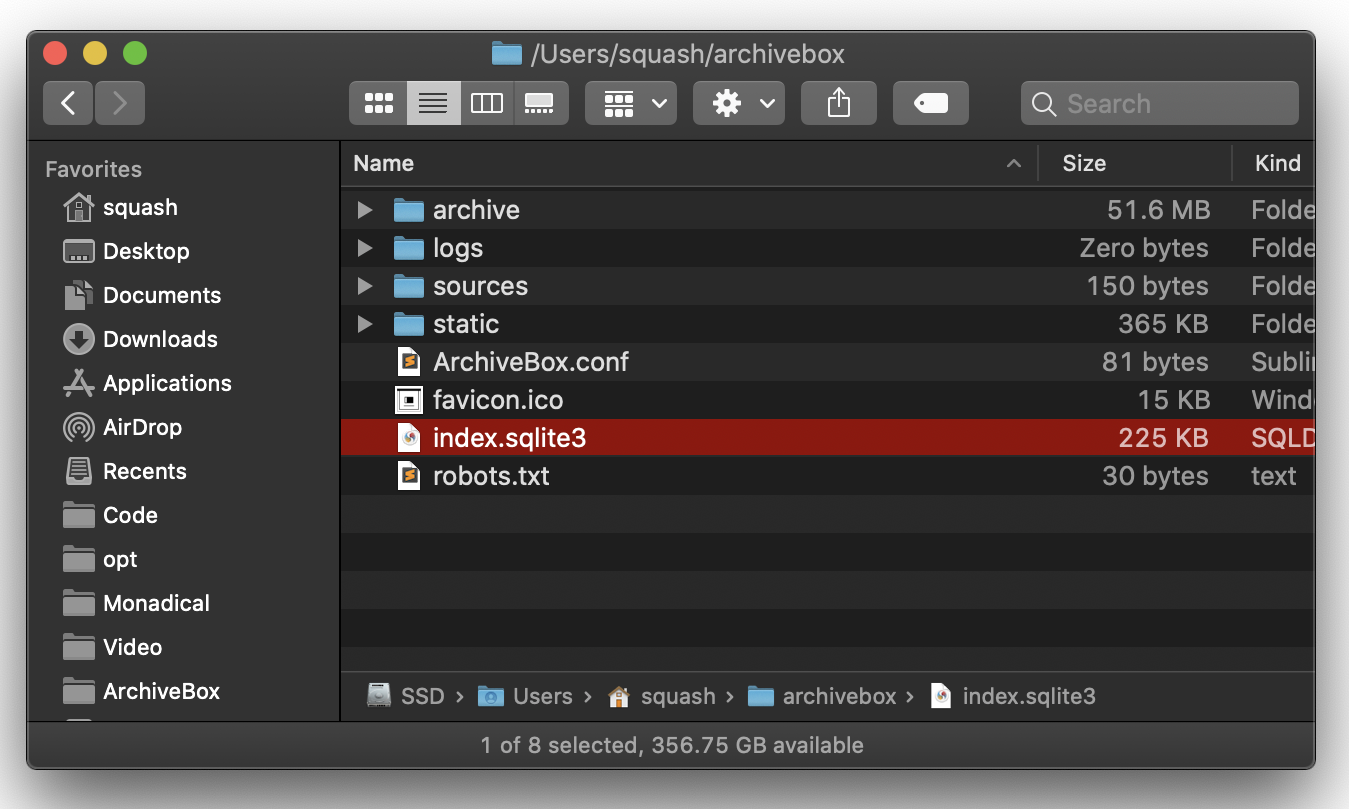
data/
    index.sqlite3
    ArchiveBox.conf
    archive/
        ...
        1617687755/
            index.html
            index.json
            screenshot.png
            media/some_video.mp4
            warc/1617687755.warc.gz
            git/somerepo.git
            ...
data/archive/TIMESTAMP/ includes a static index.json and index.html describing its contents, and the snapshot extractor outputs are plain files within the folder.
Learn More
## Static Archive Exporting You can create one-off archives of individual URLs with `archivebox oneshot`, or export your index as static HTML using `archivebox list` (so you can view it without an ArchiveBox server).
Expand to learn how to export your ArchiveBox collection...
NOTE: These exports are not paginated, exporting many URLs or the entire archive at once may be slow. Use the filtering CLI flags on the
archivebox listcommand to export specific Snapshots or ranges.
# do a one-off single URL archive wihout needing a data dir initialized
archivebox oneshot 'https://example.com'

# archivebox list --help
archivebox list --html --with-headers > index.html     # export to static html table
archivebox list --json --with-headers > index.json     # export to json blob
archivebox list --csv=timestamp,url,title > index.csv  # export to csv spreadsheet

# (if using Docker Compose, add the -T flag when piping)
# docker compose run -T archivebox list --html 'https://example.com' > index.json
Learn More
- Wiki: Publishing Your Archive (Exporting as Static HTML)
- Wiki: Security Overview (Publishing)
- Wiki: Configuration (
PUBLIC_INDEX,PUBLIC_SNAPSHOTS,PUBLIC_ADD_VIEW)

Caveats
Archiving Private Content
If you're importing pages with private content or URLs containing secret tokens you don't want public (e.g Google Docs, paywalled content, unlisted videos, etc.), you may want to disable some of the extractor methods to avoid leaking that content to 3rd party APIs or the public.
Expand to learn about privacy, permissions, and user accounts...
# don't save private content to ArchiveBox, e.g.:
archivebox add 'https://docs.google.com/document/d/12345somePrivateDocument'
archivebox add 'https://vimeo.com/somePrivateVideo'

# without first disabling saving to Archive.org:
archivebox config --set SAVE_ARCHIVE_DOT_ORG=False  # disable saving all URLs in Archive.org

# restrict the main index, Snapshot content, and Add Page to authenticated users as-needed:
archivebox config --set PUBLIC_INDEX=False
archivebox config --set PUBLIC_SNAPSHOTS=False
archivebox config --set PUBLIC_ADD_VIEW=False
archivebox manage createsuperuser

# if extra paranoid or anti-Google:
archivebox config --set SAVE_FAVICON=False          # disable favicon fetching (it calls a Google API passing the URL's domain part only)
archivebox config --set CHROME_BINARY=chromium      # ensure it's using Chromium instead of Chrome
CAUTION: Assume anyone viewing your archives will be able to see any cookies, session tokens, or private URLs passed to ArchiveBox during archiving. Make sure to secure your ArchiveBox data and don't share snapshots with others without stripping out sensitive headers and content first.
Learn More
- Wiki: Publishing Your Archive
- Wiki: Security Overview
- Wiki: Chromium Install (Setting Up a User Profile)
- Wiki: Configuration (
CHROME_USER_DATA_DIR) - Wiki: Configuration (
COOKIES_FILE)
Security Risks of Viewing Archived JS
Be aware that malicious archived JS can access the contents of other pages in your archive when viewed. Because the Web UI serves all viewed snapshots from a single domain, they share a request context and typical CSRF/CORS/XSS/CSP protections do not work to prevent cross-site request attacks. See the Security Overview page and Issue #239 for more details.
Expand to see risks and mitigations...
# visiting an archived page with malicious JS:
https://127.0.0.1:8000/archive/1602401954/example.com/index.html

# example.com/index.js can now make a request to read everything from:
https://127.0.0.1:8000/index.html
https://127.0.0.1:8000/archive/*
# then example.com/index.js can send it off to some evil server
NOTE: Only the
wget&domextractor methods execute archived JS when viewing snapshots, all other archive methods produce static output that does not execute JS on viewing.
If you are worried about these issues ^ you should disable these extractors using:
archivebox config --set SAVE_WGET=False SAVE_DOM=False.
Learn More
- Wiki: Security Overview
- ArchiveBox Github Issue: #239
- Security Advisory:
CVE-2023-45815 - Wiki: Security Overview (Publishing)
### Working Around Sites that Block Archiving For various reasons, many large sites (Reddit, Twitter, Cloudflare, etc.) actively block archiving or bots in general. There are a number of approaches to work around this, and we also provide consulting services to help here.
Click to learn how to set up user agents, cookies, and site logins...
- Set
CHROME_USER_AGENT,WGET_USER_AGENT,CURL_USER_AGENTto impersonate a real browser (by default, ArchiveBox reveals that it's a bot when using the default user agent settings) - Set up a logged-in browser session for archiving using
CHROME_USER_DATA_DIR&COOKIES_FILE - Rewrite your URLs before archiving to swap in alternative frontends that are more bot-friendly e.g.
reddit.com/some/url->teddit.net/some/url: https://github.com/mendel5/alternative-front-ends
### Saving Multiple Snapshots of a Single URL ArchiveBox appends a hash with the current date `https://example.com#2020-10-24` to differentiate when a single URL is archived multiple times.
Click to learn how the Re-Snapshot feature works...
Because ArchiveBox uniquely identifies snapshots by URL, it must use a workaround to take multiple snapshots of the same URL (otherwise they would show up as a single Snapshot entry). It makes the URLs of repeated snapshots unique by adding a hash with the archive date at the end:
archivebox add 'https://example.com#2020-10-24'
...
archivebox add 'https://example.com#2020-10-25'
 button in the Admin UI is a shortcut for this hash-date multi-snapshotting workaround.
Improved support for saving multiple snapshots of a single URL without this hash-date workaround will be added eventually (along with the ability to view diffs of the changes between runs).
button in the Admin UI is a shortcut for this hash-date multi-snapshotting workaround.
Improved support for saving multiple snapshots of a single URL without this hash-date workaround will be added eventually (along with the ability to view diffs of the changes between runs).
Learn More
Storage Requirements
Because ArchiveBox is designed to ingest a large volume of URLs with multiple copies of each URL stored by different 3rd-party tools, it can be quite disk-space intensive. There are also some special requirements when using filesystems like NFS/SMB/FUSE.
Click to learn more about ArchiveBox's filesystem and hosting requirements...
- ArchiveBox can use anywhere from ~1gb per 1000 Snapshots, to ~50gb per 1000 Snapshots, mostly dependent on whether you're saving audio & video using
SAVE_MEDIA=Trueand whether you lowerMEDIA_MAX_SIZE=750mb. - Disk usage can be reduced by using a compressed/deduplicated filesystem like ZFS/BTRFS, or by turning off extractors methods you don't need. You can also deduplicate content with a tool like
fdupesorrdfind. - Don't store large collections on older filesystems like EXT3/FAT as they may not be able to handle more than 50k directory entries in the
data/archive/folder. - Try to keep the
data/index.sqlite3file on local drive (not a network mount) or SSD for maximum performance, however thedata/archive/folder can be on a network mount or slower HDD. - If using Docker or NFS/SMB/FUSE for the
data/archive/folder, you may need to setPUID&PGIDand disableroot_squashon your fileshare server.
Learn More
- Wiki: Usage (Disk Layout)
- Wiki: Security Overview (Output-Folder)
- Wiki: Usage (Large Archives)
- Wiki: Configuration (
PUID&GUID) - Wiki: Security Overview (Do Not Run as Root)
Screenshots
|
|
|
|
|
|
|
|
|
|
Background & Motivation
ArchiveBox aims to enable more of the internet to be saved from deterioration by empowering people to self-host their own archives. The intent is for all the web content you care about to be viewable with common software in 50 - 100 years without needing to run ArchiveBox or other specialized software to replay it.
Click to read more about why archiving is important and how to do it ethically...
Vast treasure troves of knowledge are lost every day on the internet to link rot. As a society, we have an imperative to preserve some important parts of that treasure, just like we preserve our books, paintings, and music in physical libraries long after the originals go out of print or fade into obscurity.
Whether it's to resist censorship by saving news articles before they get taken down or edited, or just to save a collection of early 2010's flash games you loved to play, having the tools to archive internet content enables to you save the stuff you care most about before it disappears.
The balance between the permanence and ephemeral nature of content on the internet is part of what makes it beautiful. I don't think everything should be preserved in an automated fashion--making all content permanent and never removable, but I do think people should be able to decide for themselves and effectively archive specific content that they care about, just like libraries do. Without the work of archivists saving physical books, manuscrips, and paintings we wouldn't have any knowledge of our ancestors' history. I believe archiving the web is just as important to provide the same benefit to future generations.
ArchiveBox's stance is that duplication of other people's content is only ethical if it:
- A. doesn't deprive the original creators of revenue and
- B. is responsibly curated by an individual/institution.
In the U.S., libraries, researchers, and archivists are allowed to duplicate copyrighted materials under "fair use" for private study, scholarship, or research. Archive.org's non-profit preservation work is covered under fair use in the US, and they properly handle unethical content/DMCA/GDPR removal requests to maintain good standing in the eyes of the law.
As long as you A. don't try to profit off pirating copyrighted content and B. have processes in place to respond to removal requests, many countries allow you to use sofware like ArchiveBox to ethically and responsibly archive any web content you can view. That being said, ArchiveBox is not liable for how you choose to operate the software. You must research your own local laws and regulations, and get proper legal council if you plan to host a public instance (start by putting your DMCA/GDPR contact info in FOOTER_INFO and changing your instance's branding using CUSTOM_TEMPLATES_DIR).
Comparison to Other Projects
Check out our community wiki for a list of alternative web archiving tools and orgs.
ArchiveBox gained momentum in the internet archiving industry because it uniquely combines 3 things:
- it's distributed: users own their data instead of entrusting it to one big central provider
- it's future-proof: saving in multiple formats and extracting out raw TXT, PNG, PDF, MP4, etc. files
- it's extensible: with powerful APIs, flexible storage, and a big community adding new extractors regularly
Expand for a more direct comparison to Archive.org and specific open-source alternatives...
ArchiveBox tries to be a robust, set-and-forget archiving solution suitable for archiving RSS feeds, bookmarks, or your entire browsing history (beware, it may be too big to store), including private/authenticated content that you wouldn't otherwise share with a centralized service like Archive.org.
Comparison With Centralized Public Archives
Not all content is suitable to be archived on a centralized, publicly accessible platform. Archive.org doesn't offer the ability to save things behind login walls for good reason, as the content may not have been intended for a public audience. ArchiveBox exists to fill that gap by letting everyone save what they have access to on an individual basis, and to encourage decentralized archiving that's less succeptible to censorship or natural disasters.
By having users store their content locally or within their organizations, we can also save much larger portions of the internet than a centralized service has the disk capcity handle. The eventual goal is to work towards federated archiving where users can share portions of their collections with each other, and with central archives on a case-by-case basis.
Comparison With Other Self-Hosted Archiving Options
ArchiveBox differentiates itself from similar self-hosted projects by providing both a comprehensive CLI interface for managing your archive, a Web UI that can be used either independently or together with the CLI, and a simple on-disk data format that can be used without either.
If you want better fidelity for very complex interactive pages with heavy JS/streams/API requests, check out ArchiveWeb.page and ReplayWeb.page.
If you want more bookmark categorization and note-taking features, check out Archivy, Memex, Polar, or LinkAce.
If you need more advanced recursive spider/crawling ability beyond --depth=1, check out Browsertrix, Photon, or Scrapy and pipe the outputted URLs into ArchiveBox.
For more alternatives, see our list here...
ArchiveBox is neither the highest fidelity nor the simplest tool available for self-hosted archiving, rather it's a jack-of-all-trades that tries to do most things well by default. We encourage you to try these other tools made by our friends if ArchiveBox isn't suited to your needs.
Internet Archiving Ecosystem
Our Community Wiki strives to be a comprehensive index of the web archiving industry...
- [Community Wiki](https://github.com/ArchiveBox/ArchiveBox/wiki/Web-Archiving-Community) - [Web Archiving Software](https://github.com/ArchiveBox/ArchiveBox/wiki/Web-Archiving-Community#web-archiving-projects) _List of ArchiveBox alternatives and open source projects in the internet archiving space._ - [Awesome-Web-Archiving Lists](https://github.com/ArchiveBox/ArchiveBox/wiki/Web-Archiving-Community#the-master-lists) _Community-maintained indexes of archiving tools and institutions like `iipc/awesome-web-archiving`._ - [Reading List](https://github.com/ArchiveBox/ArchiveBox/wiki/Web-Archiving-Community#reading-list) _Articles, posts, and blogs relevant to ArchiveBox and web archiving in general._ - [Communities](https://github.com/ArchiveBox/ArchiveBox/wiki/Web-Archiving-Community#communities) _A collection of the most active internet archiving communities and initiatives._ - Check out the ArchiveBox [Roadmap](https://github.com/ArchiveBox/ArchiveBox/wiki/Roadmap) and [Changelog](https://github.com/ArchiveBox/ArchiveBox/wiki/Changelog) - Learn why archiving the internet is important by reading the "[On the Importance of Web Archiving](https://items.ssrc.org/parameters/on-the-importance-of-web-archiving/)" blog post. - Reach out to me for questions and comments via [@ArchiveBoxApp](https://twitter.com/ArchiveBoxApp) or [@theSquashSH](https://twitter.com/thesquashSH) on Twitter
Need help building a custom archiving solution?
✨ Hire the team that built Archivebox to solve archiving for your org. (@ArchiveBoxApp)
Documentation

We use the ArchiveBox GitHub Wiki for documentation.
There is also a mirror available on Read the Docs (though it's sometimes outdated).
✏️ You can submit docs changes & suggestions in our dedicated repo
ArchiveBox/docs.
Getting Started
- Quickstart
- Install
- Docker
- Usage
- Configuration
- Supported Sources
- Supported Outputs
- Scheduled Archiving
Advanced
- Security Overview
- Cookies & Sessions Setup (archiving sites that require logins)
- Setting up the Search Backends (choosing ripgrep, Sonic, or FTS5)
- Setting up Local/Remote Storages (S3/B2/Google Drive/SMB/NFS/etc.)
- Setting up Authentication & Permissions (SSO/LDAP/OAuth/API Keys/etc.)
- Publishing Your Archive (sharing your archive server with others)
- Chromium Install Options (installing and configuring ArchiveBox's Chrome)
- Upgrading or Merging Archives
- Troubleshooting
Developers
- Developer Documentation
- Python API (alpha)
- REST API (alpha)
More Info
ArchiveBox Development
All contributions to ArchiveBox are welcomed! Check our issues and Roadmap for things to work on, and please open an issue to discuss your proposed implementation before working on things! Otherwise we may have to close your PR if it doesn't align with our roadmap.
For low hanging fruit / easy first tickets, see: ArchiveBox/Issues #good first ticket #help wanted.
Python API Documentation: https://docs.archivebox.io/en/dev/archivebox.html#module-archivebox.main
Setup the dev environment
Click to expand...
#### 1. Clone the main code repo (making sure to pull the submodules as well) ```bash git clone --recurse-submodules https://github.com/ArchiveBox/ArchiveBox cd ArchiveBox git checkout dev # or the branch you want to test git submodule update --init --recursive git pull --recurse-submodules ``` #### 2. Option A: Install the Python, JS, and system dependencies directly on your machine ```bash # Install ArchiveBox + python dependencies python3 -m venv .venv && source .venv/bin/activate && pip install -e '.[dev]' # or: pipenv install --dev && pipenv shell # Install node dependencies npm install # or archivebox setup # Check to see if anything is missing archivebox --version # install any missing dependencies manually, or use the helper script: ./bin/setup.sh ``` #### 2. Option B: Build the docker container and use that for development instead ```bash # Optional: develop via docker by mounting the code dir into the container # if you edit e.g. ./archivebox/core/models.py on the docker host, runserver # inside the container will reload and pick up your changes docker build . -t archivebox docker run -it \ -v $PWD/data:/data \ archivebox init --setup docker run -it -p 8000:8000 \ -v $PWD/data:/data \ -v $PWD/archivebox:/app/archivebox \ archivebox server 0.0.0.0:8000 --debug --reload # (remove the --reload flag and add the --nothreading flag when profiling with the django debug toolbar) # When using --reload, make sure any files you create can be read by the user in the Docker container, eg with 'chmod a+rX'. ```Common development tasks
See the ./bin/ folder and read the source of the bash scripts within.
You can also run all these in Docker. For more examples see the GitHub Actions CI/CD tests that are run: .github/workflows/*.yaml.
Run in DEBUG mode
Click to expand...
```bash archivebox config --set DEBUG=True # or archivebox server --debug ... ``` https://stackoverflow.com/questions/1074212/how-can-i-see-the-raw-sql-queries-django-is-runningInstall and run a specific GitHub branch
Click to expand...
##### Use a Pre-Built Image If you're looking for the latest `dev` Docker image, it's often available pre-built on Docker Hub, simply pull and use `archivebox/archivebox:dev`. ```bash docker pull archivebox/archivebox:dev docker run archivebox/archivebox:dev version # verify the BUILD_TIME and COMMIT_HASH in the output are recent ``` ##### Build Branch from Source You can also build and run any branch yourself from source, for example to build & use `dev` locally: ```bash # docker-compose.yml: services: archivebox: image: archivebox/archivebox:dev build: 'https://github.com/ArchiveBox/ArchiveBox.git#dev' ... # or with plain Docker: docker build -t archivebox:dev https://github.com/ArchiveBox/ArchiveBox.git#dev docker run -it -v $PWD:/data archivebox:dev init --setup # or with pip: pip install 'git+https://github.com/pirate/ArchiveBox@dev' npm install 'git+https://github.com/ArchiveBox/ArchiveBox.git#dev' archivebox init --setup ```Run the linters / tests
Click to expand...
```bash ./bin/lint.sh ./bin/test.sh ``` (uses `flake8`, `mypy`, and `pytest -s`)Make DB migrations, enter Django shell, other dev helper commands
Click to expand...
```bash # generate the database migrations after changes to models.py cd archivebox/ ./manage.py makemigrations # enter a python shell or a SQL shell cd path/to/test/data/ archivebox shell archivebox manage dbshell # generate a graph of the ORM models brew install graphviz pip install pydot graphviz archivebox manage graph_models -a -o orm.png open orm.png # list all models with field db info and methods archivebox manage list_model_info --all --signature --db-type --field-class # print all django settings archivebox manage print_settings archivebox manage print_settings --format=yaml # pip install pyyaml # autogenerate an admin.py from given app models archivebox manage admin_generator core > core/admin.py # dump db data to a script that re-populates it archivebox manage dumpscript core > scripts/testdata.py archivebox manage reset core archivebox manage runscript testdata # resetdb and clear all data! archivebox manage reset_db # use django-tui to interactively explore commands pip install django-tui # ensure django-tui is in INSTALLED_APPS: core/settings.py archivebox manage tui # show python and JS package dependency trees pdm list --tree npm ls --all ```Contributing a new extractor
Click to expand...
ArchiveBox [`extractors`](https://github.com/ArchiveBox/ArchiveBox/blob/dev/archivebox/extractors/media.py) are external binaries or Python/Node scripts that ArchiveBox runs to archive content on a page. Extractors take the URL of a page to archive, write their output to the filesystem `data/archive/TIMESTAMP/EXTRACTOR/...`, and return an [`ArchiveResult`](https://github.com/ArchiveBox/ArchiveBox/blob/dev/archivebox/core/models.py#:~:text=return%20qs-,class%20ArchiveResult,-(models.Model)%3A) entry which is saved to the database (visible on the `Log` page in the UI). *Check out how we added **[`archivebox/extractors/singlefile.py`](https://github.com/ArchiveBox/ArchiveBox/blob/dev/archivebox/extractors/singlefile.py)** as an example of the process: [Issue #399](https://github.com/ArchiveBox/ArchiveBox/issues/399) + [PR #403](https://github.com/ArchiveBox/ArchiveBox/pull/403).*
**The process to contribute a new extractor is like this:** 1. [Open an issue](https://github.com/ArchiveBox/ArchiveBox/issues/new?assignees=&labels=changes%3A+behavior%2Cstatus%3A+idea+phase&template=feature_request.md&title=Feature+Request%3A+...) with your propsoed implementation (please link to the pages of any new external dependencies you plan on using) 2. Ensure any dependencies needed are easily installable via a package managers like `apt`, `brew`, `pip3`, `npm` (Ideally, prefer to use external programs available via `pip3` or `npm`, however we do support using any binary installable via package manager that exposes a CLI/Python API and writes output to stdout or the filesystem.) 3. Create a new file in [`archivebox/extractors/EXTRACTOR.py`](https://github.com/ArchiveBox/ArchiveBox/blob/dev/archivebox/extractors) (copy an existing extractor like [`singlefile.py`](https://github.com/ArchiveBox/ArchiveBox/blob/dev/archivebox/extractors/singlefile.py) as a template) 4. Add config settings to enable/disable any new dependencies and the extractor as a whole, e.g. `USE_DEPENDENCYNAME`, `SAVE_EXTRACTORNAME`, `EXTRACTORNAME_SOMEOTHEROPTION` in [`archivebox/config.py`](https://github.com/ArchiveBox/ArchiveBox/blob/dev/archivebox/config.py) 5. Add a preview section to [`archivebox/templates/core/snapshot.html`](https://github.com/ArchiveBox/ArchiveBox/blob/dev/archivebox/templates/core/snapshot.html) to view the output, and a column to [`archivebox/templates/core/index_row.html`](https://github.com/ArchiveBox/ArchiveBox/blob/dev/archivebox/templates/core/index_row.html) with an icon for your extractor 6. Add an integration test for your extractor in [`tests/test_extractors.py`](https://github.com/ArchiveBox/ArchiveBox/blob/dev/tests/test_extractors.py) 7. [Submit your PR for review!](https://github.com/ArchiveBox/ArchiveBox/blob/dev/.github/CONTRIBUTING.md) 🎉 8. Once merged, please document it in these places and anywhere else you see info about other extractors: - https://github.com/ArchiveBox/ArchiveBox#output-formats - https://github.com/ArchiveBox/ArchiveBox/wiki/Configuration#archive-method-toggles - https://github.com/ArchiveBox/ArchiveBox/wiki/Install#dependencies
Build the docs, pip package, and docker image
Click to expand...
(Normally CI takes care of this, but these scripts can be run to do it manually) ```bash ./bin/build.sh # or individually: ./bin/build_docs.sh ./bin/build_pip.sh ./bin/build_deb.sh ./bin/build_brew.sh ./bin/build_docker.sh ```Roll a release
Click to expand...
(Normally CI takes care of this, but these scripts can be run to do it manually) ```bash ./bin/release.sh # or individually: ./bin/release_docs.sh ./bin/release_pip.sh ./bin/release_deb.sh ./bin/release_brew.sh ./bin/release_docker.sh ```Further Reading

- ArchiveBox.io Website / ArchiveBox Github (Source Code) / ArchiveBox Demo Server
- Documentation (Github Wiki) / API Reference Docs (ReadTheDocs) / Roadmap / Changelog
- Bug Tracker (Github Issues) / Discussions (Github Discussions) / Community Chat Forum (Zulip)
- Find us on social media: Twitter
@ArchiveBoxApp, LinkedIn, YouTube, SaaSHub, Alternative.to, Reddit




ArchiveBox operates as a US 501(c)(3) nonprofit FSP (sponsored by HCB), direct donations are tax-deductible.



ArchiveBox was started by Nick Sweeting in 2017, and has grown steadily with help from our amazing contributors.
✨ Have spare CPU/disk/bandwidth after all your 网站存档爬 and want to help the world?
Check out our Good Karma Kit...